Xelta logo
Image
Video
Audio
Xelta Cut
Video Editing
Video Stitching
Photo Lab
Moodboard AI
Background Remover
Motion Control
Character Replacement
Story Tweak
VFX Effects
AI MultiCam
Back Stage
Video To Anime
Edit
Xelta CutOpen the Xelta Cut video editor
Microdrama
MicroDrama 2.0
Script & Character
AI Lords
Anime Microdrama
Super Intelligence
Cinematic Studio
Video Lens
Movie Trailer
Comic Flow
Microcourse
AI Film
MicrodramaCreate engaging micro-dramas
Future Canvas
Gen Avatar
Sketch To Motion
AI Wallpaper
Sketch To Image
Virtual Try On
Home Design
Canvas Pro
Design Studio
Future CanvasVisualize ideas on Future Canvas
Instant Ad
Ad Maker
Prime Ad (60 sec)
Street Ad
UGC Ads
Giant Ads
URL to Ads
Marketing & Ads Use Case
AI Ads
Instant AdCreate campaign with just a link
Voice Dub
Voice Lip Sync
AI Voices
Voice Studio
Audio Enhancer
AI Music
Voices
Voice DubAdd voiceovers and dubbing to videos
Reel Creator
Instagram Autopost
LinkedIn Autopost
Facebook Autopost
LinkedIn Brand Website
YouTube Autopost
AI Influencer
WhatsApp & Telegram
Social Use Case
SocialVerse
Reel CreatorCreate engaging 30-second reels with AI
Website Builder
Face Swap
Design Use Case
Photo Relighter
AI Transcription
Tools
Website BuilderGenerate full websites
MCP
GPT Plugin
Developer
MCPModel Context Protocol
Games
Events
Pricing
Enterprise
Reelix
AI FilmDesign StudioCreateAI AdsEdit
Figma Plugin · Powered by Xelta AI Bridge

XELTA PLUGINS
BUILT FORCREATIVES

The Xelta Figma Plugin connects your canvas to the Xelta AI Bridge — generate images, run Mixboard, swap faces, remove backgrounds, apply Photo Lab effects, create street ads, and analyse food, all without leaving Figma.

Browse Plugins
FigmaLive
Checking bridge…
Figma logo

Figma Plugin

Built for Figma creators

This section focuses on the live Figma integration only. It powers a tight loop for image generation, background cleanup, face swapping, Photo Lab enhancements, street-ad creation, and food analysis. Everything starts in Figma and comes back onto the canvas.

Live
Fg

Plugin

Figma Plugin

The active Xelta integration. Generate images, swap faces, remove backgrounds, run Mixboard, apply Photo Lab effects, create street ads, and analyse food — all from a single Figma panel connected to the Xelta Figma Bridge API. The plugin checks bridge health, validates sessions, and keeps the workflow centered on one goal: getting AI results into Figma as quickly and cleanly as possible.

Use it to jump from a prompt to a ready-to-edit canvas result without leaving the Figma context. The bridge handles the auth flow, the background polling, and the image transfer, so the UI stays focused on creation instead of plumbing.

Bridge health checkJWT session validationCanvas insertion
Install Now
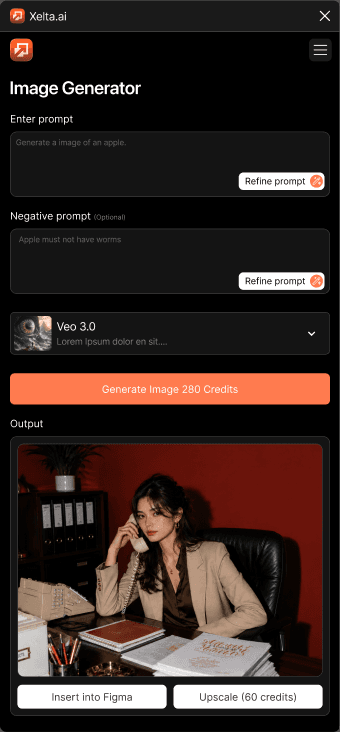

Figma Plugin preview

How the Figma Plugin Works

From prompt to canvas

The Figma plugin UI communicates with the Xelta Bridge API. . The bridge handles auth, polling, retries, and image conversion so the plugin UI stays simple.

01
GET /health

Confirm Bridge

Plugin pings the bridge to confirm it is running before doing anything else.

02
GET /api/me

Validate Session

If a JWT is stored in Figma clientStorage, it is validated with the bridge. Decoded locally — no upstream call.

03
POST /auth/start

Start Sign-In

No valid session? The plugin calls /auth/start, gets an authUrl + flowId + readKey, and opens the URL in the system browser.

04
POST /auth/poll

Poll for JWT

Plugin polls every 2 s with flowId + readKey. When status === 'complete', it extracts the JWT and stores it in Figma clientStorage.

05
POST /api/image · /api/mixboard · etc.

Call Feature API

With a valid JWT, the plugin calls the relevant endpoint. Long-running jobs (Mixboard, Face Swap, Street Ad, Food Analysis) can take minutes — the bridge handles polling internally.

06
postMessage → insert-image

Insert onto Canvas

The base64 data URL is decoded to bytes and sent to code.ts via postMessage. Figma creates a rectangle node with the image fill on the active canvas.

⚠️  The protected feature endpoints (/api/image, /api/mixboard, /api/face-swap, …) require a JWT Bearer token obtained through the Figma browser sign-in flow. They are called from inside the Figma plugin UI only — not from this marketing website. The image results are inserted directly onto the Figma canvas via figma.createImage().

Xelta · AI Image Generation
AI image generation inside Figma
50 credits per call

Figma Plugin Capability

AI Image Generation

Generate production-ready images from natural language directly inside Figma. Choose from multiple models, set aspect ratios, and let Xelta drop the result straight onto your canvas — no context switch needed.

Discover More

Figma Plugin Capability

Mixboard

Run a single prompt through the Mixboard pipeline and get up to 12 unique image variants back in seconds. Perfect for rapid mood-boarding, A/B creative testing, and client presentations — all without leaving the plugin.

Discover More
Xelta · Mixboard
Mixboard multi-image generation
Xelta · Background Remover
Background removal result inside Figma

Figma Plugin Capability

Background Remover

Cut out subjects, make backgrounds transparent, apply creative blurs, or flood-fill with any hex colour. The plugin sends your selected layer to the API and inserts the processed result back onto the Figma canvas.

Discover More

Every Tool In The Plugin

Seven API-backed capabilities, all accessible from one Figma panel

AI Image Generation

Create any visual with a text prompt

AI image generation inside Figma
Open plugin

Mixboard

Generate multiple creative variants at once

Mixboard multi-image generation
Open plugin

Background Remover

Four modes: remove, transparent, blur, color

Background removal result inside Figma
Open plugin

Face Swap

Seamlessly replace faces in any photo

Face swap preview
Open plugin

Street Ad Generator

Turn brand names into graffiti-style street ads

Street ad graffiti generator
Open plugin

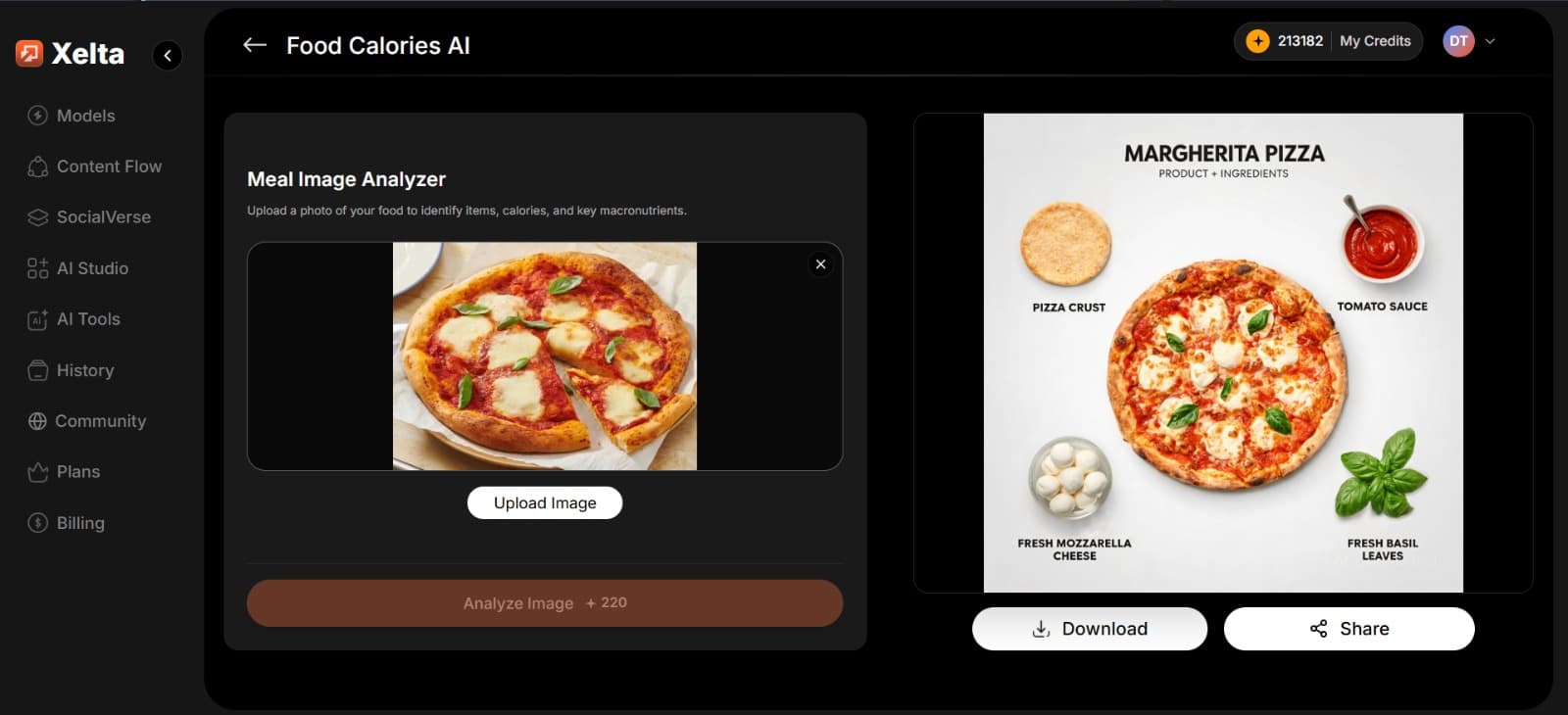
Food Analysis

Detect ingredients and generate an infographic

Food analysis infographic
Open plugin

Frequently
asked questions

The Xelta Figma Plugin connects your Figma workspace to the Xelta Figma Bridge API. It lets you generate images, run Mixboard, swap faces, remove backgrounds, apply Photo Lab effects, create street ads, and analyse food — directly on your Figma canvas.
On first use the plugin launches a browser sign-in flow via POST /auth/start, opens the returned authUrl in your system browser, then polls POST /auth/poll every 2 seconds until your session is confirmed. The JWT is stored in Figma's clientStorage under the key xeltaPluginSession and revalidated on every plugin open via GET /api/me.
Credits are deducted per API call. Image generation costs 50 credits per image, Photo Lab costs 1 000 credits, and Street Ad costs 280 credits. Your live balance is shown in the plugin via GET /api/balance. Mixboard, Background Removal, Face Swap, and Food Analysis do not have a fixed per-call credit cost listed in the current API.
The plugin UI sends messages to Figma's code.ts layer via postMessage. It can insert generated images as rectangle fills (insert-image), export selected layers as PNG bytes for processing (get-selection-image), open external URLs in the system browser (open-external-url), and store or clear the session JWT in clientStorage.
All image inputs must be base64 data URLs (data:{mime-type};base64,{bytes}). All image outputs are also base64 data URLs, ready for direct <img src> display or insertion into Figma via figma.createImage().
Mixboard, Face Swap, Food Analysis, and Street Ad can each take several minutes. If a job times out, credits may have been deducted without a result being returned — the backend does not automatically refund. The plugin will show you an error message; check your credit balance at xelta.ai and retry if needed.
Background

Built for the next
generation of digital artists.

Xelta LogoXelta.AI
Google Play QR Code
Google Play
App Store QR Code
App Store

AI Generation

  • AI Image Generator
  • AI Video Generator
  • AI Audio Generator

AI Films

  • Microdrama
  • MicroDrama 2.0
  • Script & Character
  • AI Lords
  • Anime Microdrama
  • Super Intelligence
  • Cinematic Studio
  • Video Lens
  • Movie Trailer
  • Comic Flow
  • Microcourse

AI Ads

  • Instant Ad
  • Ad Maker
  • Prime Ad
  • Street Ad
  • UGC Ads
  • Giant Ads
  • URL to Ads
  • Marketing & Ads

SocialVerse

  • Reel Creator
  • Instagram Autopost
  • LinkedIn Autopost
  • Facebook Autopost
  • LinkedIn Website
  • YouTube Autopost
  • AI Influencer
  • WhatsApp & Telegram
  • Social Use Case

Resources

  • About Us
  • Blogs
  • Events
  • Pricing
  • Press Releases
  • Contact
  • Community
  • Reelix
  • AI Generator
  • Games

Video Models

  • Seedance 2.5
  • Seedance 2.0
  • Kling 3.0
  • Veo 3.0 Introduction
  • WAN 2.6
  • Grok Imagine 1.5
  • Gemini Omni Flash

Edit

  • Xelta Cut
  • Video Editing
  • Video Stitching
  • Photolab
  • Moodboard AI
  • Background Remover
  • Motion Control
  • VFX Effects
  • AI MultiCam
  • Back Stage
  • Video To Anime
  • Character Replacement
  • Story Tweak

Design Studio

  • Future Canvas
  • Gen Avatar
  • Sketch to Motion
  • AI Wallpaper
  • Sketch To Image
  • Virtual Try On
  • Home Design
  • Canvas Pro

Voices

  • Voice Dub
  • Voice Lip Sync
  • AI Voices
  • Voice Studio
  • Audio Enhancer
  • AI Music

Tools

  • Website Builder
  • Face Swap
  • Design Use Case
  • Photo Relighter
  • AI Transcription

Legal

  • Terms & Conditions
  • Privacy Policy
  • Security
  • Refund Policy
  • FAQs
  • Sitemap
  • Credits Usage

Image Models

  • Gemini 2.5 Flash Image (Nano Banana)
  • Flux Kontext Pro
  • Seedream 5.0 Pro
  • GPT Image 2

© 2026 Xelta. All rights reserved. Built for the
next generation of creators.

Follow us on: