



Key Takeaways
- The best AI image generator for interior design depends on your needs, whether you want style inspiration, room redesigns, furniture placement or professional client visuals.
- REimagineHome is useful for photo based room redesigns, Planner 5D for floor plans, IKEA Kreativ for furniture visualisation, and Xelta for exploring interior design concepts.
- Use clear room photos, accurate measurements and detailed prompts to generate more relevant design ideas.
- Check that AIgenerated images preserve essential features such as doors, windows, radiators and room proportions.
- AI interior renders are useful for visual inspiration but cannot replace measured floor plans, professional assessments or construction planning.
- Compare tools using the same room photo and test targeted revisions, material realism, export quality and usage rights.
- Consider subscription fees, credits, editing time and privacy policies when evaluating the overall cost.
- Present AI generated room designs as concepts, keep the original photos and verify furniture dimensions before making purchasing or renovation decisions.
Table of Contents
- 1.Best AI Image Generators for Interior Design in 2026
- 2.Quick Answer
- 3.What Type of Interior Design Work Are You Trying to Do?
- 4.Which AI Interior Design Tools Are Worth Comparing?
- 5.What Should You Prepare Before Uploading a Room Photo?
- 6.How Would You Redesign One Difficult Living Room?
- 7.What Prompt Works Best for a Room Redesign?
- 8.How Do You Test Tools Fairly Before Paying?
- 9.How Do You Know Whether the Furniture Really Fits?
- 10.When Is a Dedicated Home Design Tool More Useful?
- 11.What Are the Biggest Mistakes in AI Interior Images?
- 12.How Should You Compare Costs and Commercial Use?
- 13.Final Thoughts
Best AI Image Generators for Interior Design in 2026
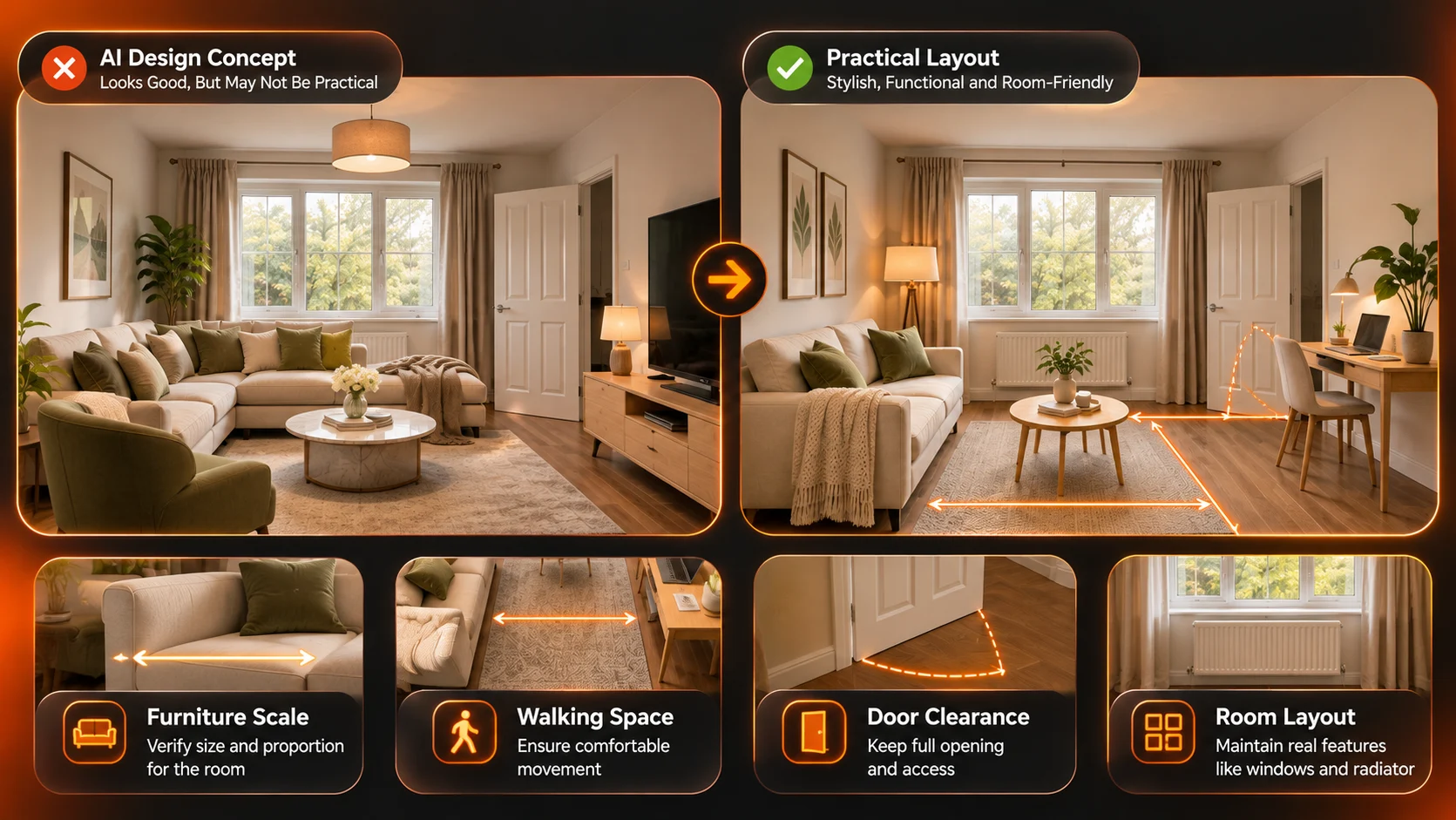
A homeowner uploads an image of a small living room and wants it redesigned in a warm modern style. The image has been made to look large, but the window has been made larger, a radiator has been taken out and a sofa has been shoved in which would block the door.
Just because something looks beautiful doesn't mean that it can be built. Finding the best AI image generator will help you come up with some ideas whilst keeping the actual room in mind.
Quick Answer
The best AI image generator for interior design will depend on what you’re trying to achieve. If you want to redesign a photo of your room, then REimagineHome is great. If you need help with floorplans and design visuals, then Planner 5D will be useful. IKEA Kreativ will assist with furniture layout and Xelta can help with room ideas and images. You should compare the tools based on how well they preserve architecture, can take references, allow edits and export.
What Type of Interior Design Work Are You Trying to Do?
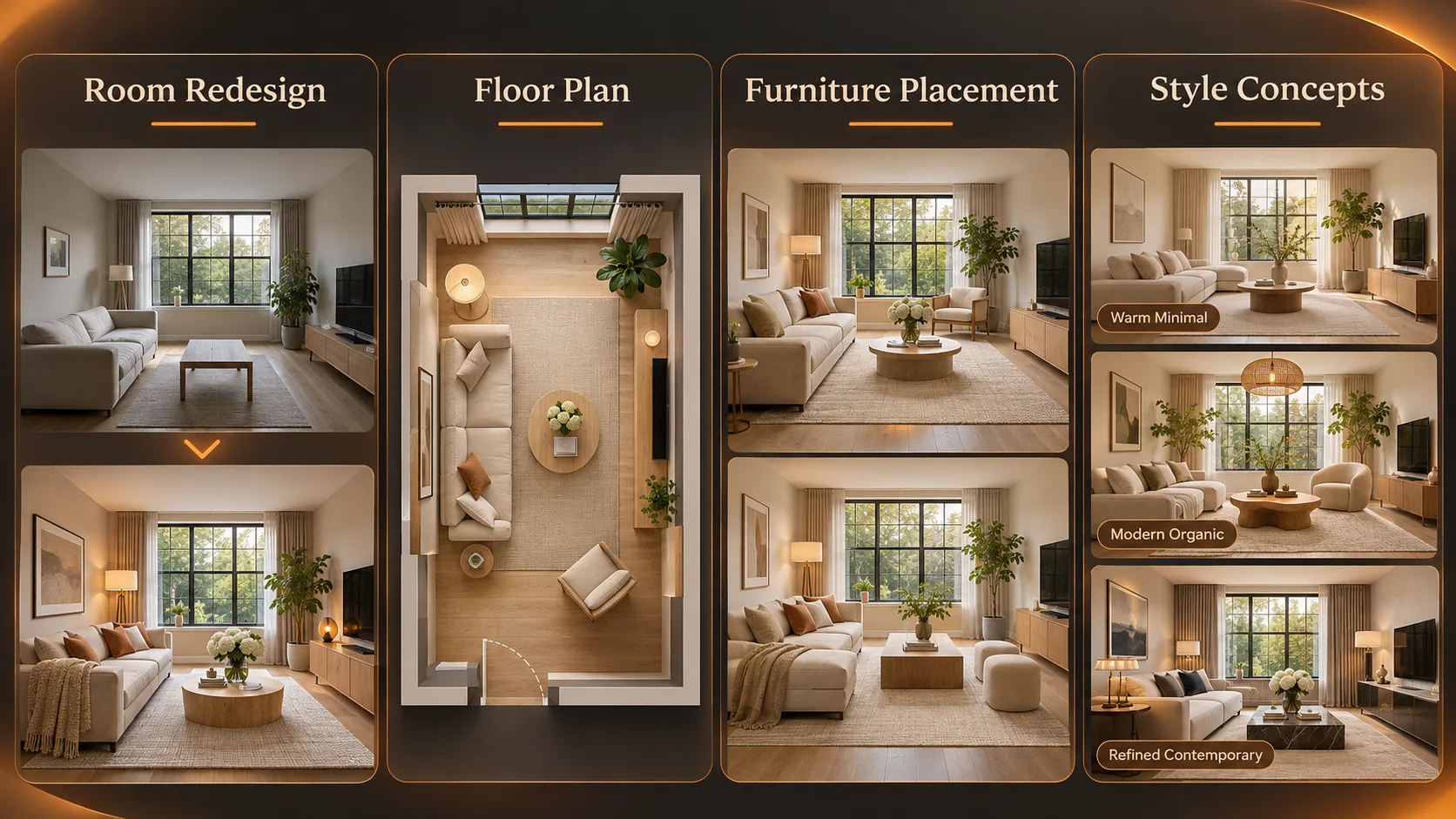
Whilst both image generators and room planners can be used to create the correct imagery for your project, they serve slightly different purposes. A visualiser will help you see what your sage green walls and light wood would look like. Whereas a planner will help you plan out your room layout. However, it is always a good idea to check your room in real life.
Consider what you would like to achieve with your tool:
- Style: To get ideas of what Scandinavian/Japandi/contemporary styles look like without purchasing any items.
- Redesign: To keep the real look of your room but update furniture, colours or finishes.
- Layout: To try out where your furniture will go.
- Client: To allow changes, clean outputs and keep track of what has been proposed.
- Marketing (Real Estate): To provide an image to stage your property that can be used as a guide but doesn’t give a false impression of the property.
A creative production workspace may be useful for visual experiments, but it should not be mistaken for a measured design or construction system. Choose the job first, then the product.
Which AI Interior Design Tools Are Worth Comparing?
| Tool | Most useful starting point | Main limitation to check |
|---|---|---|
| REimagineHome | Upload a real room and explore furnishing, decor and finish changes | Whether each edit truly leaves doors, windows and other fixed features intact |
| Planner 5D | Build or upload floor plans, explore room layouts and create design visuals | Which planning, AI Studio and export features require a subscription |
| IKEA Kreativ | Visualise and rearrange furniture from IKEA's catalogue in a room | Product availability, scanning options and device compatibility |
| Xelta | Explore room style concepts with Home Design and create additional visual directions | Whether a concept preserves measured geometry and supports the export needed |
These are not ranked based on impartial image quality testing but based on documented processes by providers.
REimagineHome would make a good choice if you want to do a quick before and after test. If your project includes floor plans then Planner 5D is definitely worth looking at. IKEA Kreativ will be very useful if you want to test buying actual furniture.
A general generator could be a good choice for getting a general idea of the mood.
What Should You Prepare Before Uploading a Room Photo?
Take a well lit image of your space. Try to ensure there is no distortion due to extreme wide angles. This can cause the room to look bigger and make the furniture look off. Ensure that there is also floor, ceiling and at least 2 walls visible. Take an additional image of any corners which were not visible in your first image.
Gather some information about your room. Find out how big the room is, where doors open in/out, where the windows are, where there are built in heating units, where you have electricity sockets, what furniture needs to stay, what colours you would prefer and how much money you have to work with.
If there are any family photographs, addresses or personal documents in your image then these should be removed.
If you are working on a professional project, keep a copy of your original image and ensure you have the photographer's permission to use it through a third party service. Having a good input package will help to reduce any guess work, however, it can't guarantee accuracy.
How Would You Redesign One Difficult Living Room?
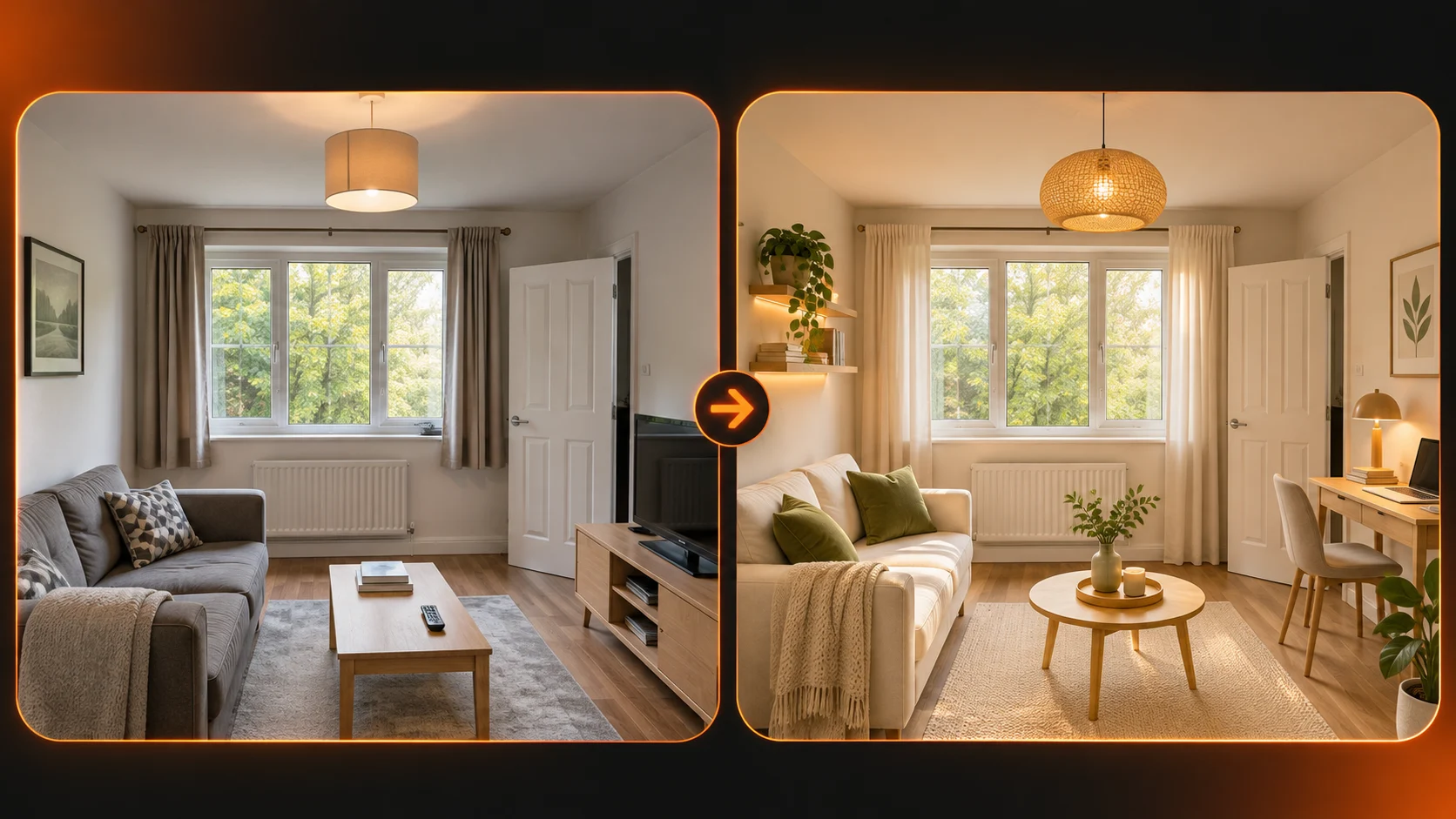
You have a room of 3.2 x 4.1 meters. There is one large window, a radiator under the window and an inward opening door. The customer wants a 2 seater, a small desk, warm neutrals and easy access to the door.
Create a basic layout based on the original photo with annotations. This layout will help you think about the style.
Now create a layout with a pale oak coffee table, simple fabrics and warm white walls. No changes to any openings, plumbing or heating.
Now create another layout with just the colour of the sofa changed. If the AI moves the window or adds additional doors then it will fail.
The room can appear to make sense but may not be possible to do.
What Prompt Works Best for a Room Redesign?
Give a clear instruction:
Create a cosy modern interior using the provided photo of a 3.2m x 4.1m living room. Include a small 2 seater sofa, slim desk and light oak coffee table. The walls should be a pale off white with soft olive accents. Keep the same doors, windows and radiators. The floor should be at the same height in relation to the camera. Do not include any new openings or built in storage. Keep the layout realistic and clutter free. This is a design concept and not a scale floorplan.
You can use a reference image generator to experiment with different styles or to create alternative scenarios.
However, just because you specify that you want to keep the room as it is doesn’t mean everything will stay the same. Make sure you check the image against the original.
If you want to test how the tool reacts to changing materials then keep it brief:
Change the walls to warm white and the curtains to natural linen. Keep the furniture, lighting and openings the same.
Keeping the changes small will make it easier to see if the tool is sticking to your instructions.
How Do You Test Tools Fairly Before Paying?
Give every shortlisted tool the same photograph and the same basic goal. Where a product uses menus instead of free text prompts, select the nearest equivalent style and note that difference.
- Save the unedited baseline: Preserve the first output; don't silently replace it with a heavily corrected version.
- Inspect fixed features: Compare window size, ceiling line, door position, radiator and floor boundaries.
- Request one targeted revision: Change the sofa fabric, not the whole room, and see what else moves.
- Check material realism: Look at reflections, wood grain, shadows and repeated patterns.
- Review the final export: Confirm image dimensions, watermark, usage rights and file access.
- Record the effort: Count generations, paid credits and manual corrections needed to reach a useful concept.
Start with a simple scorecard: Architecture preservation, style relevance, revision management, quality of exports and overall effort.
Give additional weighting to areas that are most important to your project. If it is a renovation, you will want to be more concerned about how accurate the architecture is than the styling. If it is a mood board then maybe you care more about the visual exploration.
How Do You Know Whether the Furniture Really Fits?
It can be difficult to judge from high quality AI images. Objects may appear out of scale. A small corridor can look much larger if it looks good from a perspective point of view.
Check how big the room is. Measure any furniture that is being placed to make sure there will be enough space to fit through the door. Take into consideration how you will walk around and if drawers, cupboards and chairs will be able to open/close.
If you need exact measurements for where things go, use a floor planner that uses measurements. If you want something that looks nice then have a qualified designer check your layout. A nice render can be a good talking point but won’t give you an accurate layout.
When Is a Dedicated Home Design Tool More Useful?
A room focused interface can remove some prompt writing.
A photo based home design tool supports a source image, room type, design style and custom instructions, with downloadable or shareable visual output.
This could be a great way to get an idea of what your living room could look like.
However, it won’t provide you with an accurate plan that you can use to build from. It is more of a guideline to have a conversation with the homeowner/designer about.
If you need precise information on where your furniture will go, wiring circuits or any structural changes then you’ll need specialist planning software and professional measurements.
What Are the Biggest Mistakes in AI Interior Images?
The most obvious issue would be that the layout has been altered, for example windows have increased in size, missing doors or added alcoves.
Rooms could appear bright and sunny when in fact they are facing a shaded courtyard. Ceiling light fittings or sockets may also be missing.
The material can cause issues too. The generator may produce an image using marble when the brief is said to look like laminate. Or maybe the low cost fabric doesn’t look like high quality upholstery.
Just because the textures look beautiful doesn’t mean the material will be available from the supplier, or that the finish will last, or how much it will cost to fit.
Never present the image as if it is a photo of the finished product. If you are presenting it to a client then always state that it is an AI generated design concept. The image should be presented alongside the original photo of the room.
If you are using it for property marketing then ensure you are adhering to any disclaimers on the platform you are using.
How Should You Compare Costs and Commercial Use?
After creating 8 different versions of an image, only 2 may be approved and then an editor would still have to make small changes.
Consider the cost of each approved concept, including any subscription or credits fees and editing time.
How many exports are provided? Are there additional costs for high resolution files? Can you use them for commercial use / advertising?
If the project includes using a real customers room, check their privacy and retention policies before uploading photos.
Don’t assume that the highest tier will provide accurate measurements or that a cheaper option won’t provide a useful moodboard. Try a workflow that will actually work for you.
Final Thoughts
Using the correct AI interior design tool will help you to get the best out of your design process, without getting confused between your vision and what you can actually construct.
Whilst a realistic room render can inspire a new colour scheme or give you an idea of what furniture you want to go for it will not confirm whether your sofa will fit through the door, whether your material is available locally or if your layout meets any technical requirements.
Use a realistic photo, measured drawing and clearly defined list of fixed elements.
Use 2/3 tools to design your tricky brief and ask for a small amendment. Keep your original image visible and keep a note of the changes made. Be honest with your naming of your concepts.
Pick the platform that keeps your key elements and makes your next decision easier.
For practical examples of visual design workflows, explore official creative tutorials.