



Key Takeaways
- A polished demo is not enough to prove that repurpose ai video will work in a real production week.
- Making a distinct clip for Instagram Reels, YouTube Shorts, and ad pushes often involves redoing that same editing job three times.
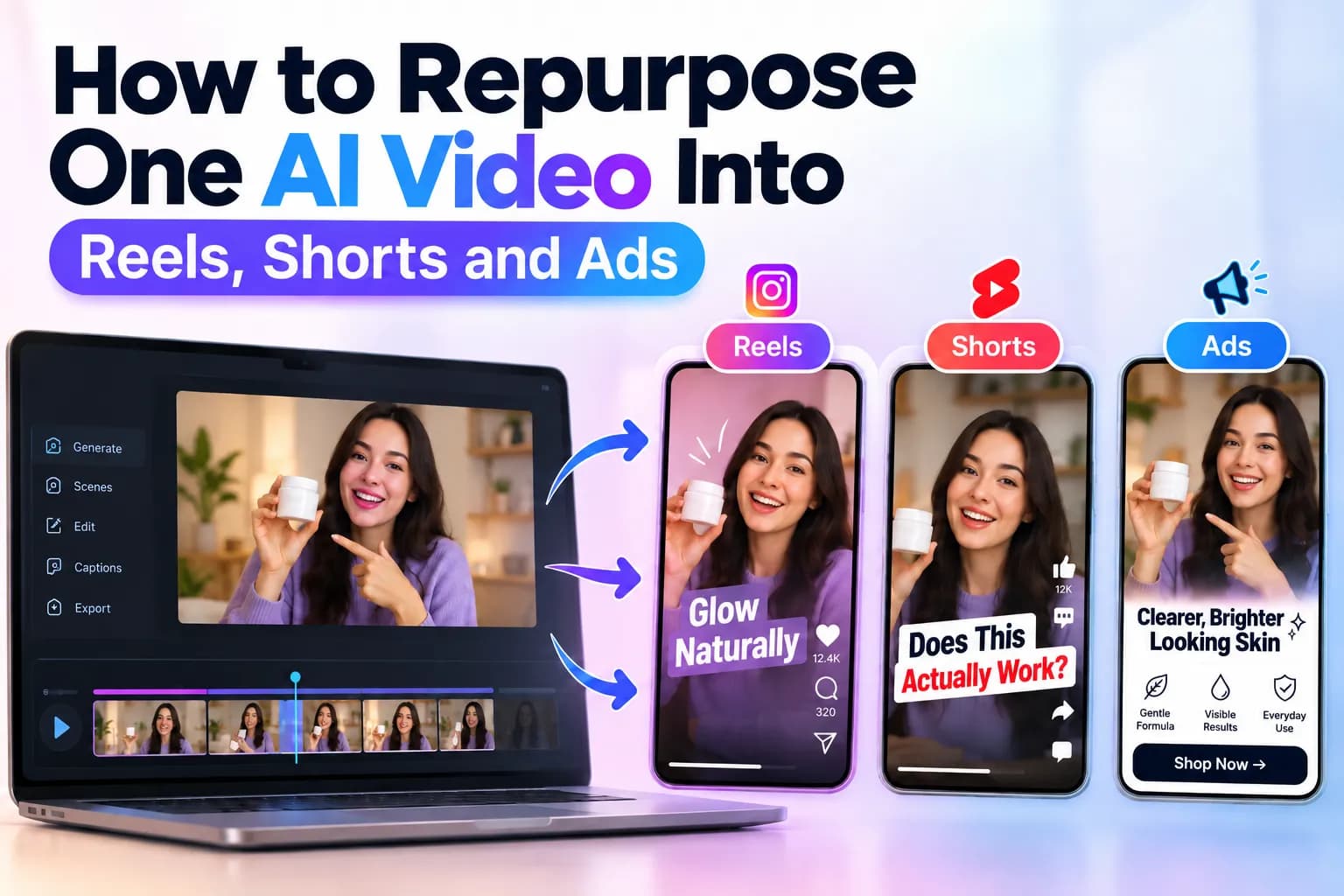
- Converting an already created AI-made clip into something fresh counts as AI video repurposing since it avoids rebuilding the whole shoot from scratch.
- A useful process for taking a single source clip into three ready-to-publish items.
Table of Contents
- 1.How to Repurpose One AI Video Into Reels, Shorts and Ads
- 2.Quick Answer
- 3.What Does It Mean to Adapt an Artificial Intelligence Generated Clip?
- 4.How Can You Reuse One AI Video Step by Step?
- 5.Which Changes Matter for Reels, Shorts, and Ads?.
- 6.How Can Xelta Help With AI Video Repurposing?
- 7.Final Thoughts
Quick Answer
Making a distinct clip for Instagram Reels, YouTube Shorts, and ad pushes often involves redoing that same editing job three times. A superior method involves recycling AI clips by beginning with one solid master file and modifying its content, speed, and look for every single channel.
Using Xelta AI allows developers to create initial video files and construct processes based on assets that can be reused again. A key component involves determining what specific parts should stay constant versus what needs modification prior to release. To transform a single AI-generated clip into Reels, Shorts, and advertisements, first build a superior master file, locate its most compelling sections, then craft distinct cuts tailored to specific channels. Modify the initial hook, duration, overlay text, orientation, and final prompt. Inspect each iteration prior to release instead of merely broadcasting the identical segment across all outlets.
What Does It Mean to Adapt an Artificial Intelligence Generated Clip?
Converting an already created AI-made clip into something fresh counts as AI video repurposing since it avoids rebuilding the whole shoot from scratch.
For example, a 45-second product showcase could turn into a 15-second Instagram Reel, a 30-second YouTube Short, and a 10-second promotional advertisement.
Every iteration draws clips from one identical origin yet fulfills a distinct goal. The Reel could highlight aesthetic attraction, the Short might clarify a practical function, and the advertisement may concentrate on prompting a transaction.
The aim isn't to copy the data. It's to render that identical substance practical across varied observation contexts.
How Can You Reuse One AI Video Step by Step?
A useful process for taking a single source clip into three ready-to-publish items.
Step 1: Create a Reusable Master Video
Begin using clips that hold sufficient visual range to allow for several cuts.
You may employ Xelta's AI video creation toolto produce a preliminary clip based on either a textual command or a source picture, contingent upon the specific process you have chosen.
When planning a product campaign, think about using one main video that includes an intro to the item, shots showing small parts, a live demo, and a closing image of the finished good.
Try to keep static labels or marketing copy away from key image zones. Storing them apart allows greater ease during future modifications.
Step 2: Identify the Most Useful Moments
Observe the main clip and identify segments capable of conveying a concept on their own.
Seek out a compelling visual start, an obvious display, a distinct shift, or a striking closing frame.
A helpful segment ought to retain meaning even after being taken out of its source timeline. Should audiences require the prior twenty seconds to grasp it, then that instant likely calls for a revised opening.
Step 3: Create an Instagram Reel
Generally, Instagram Reels perform effectively when paired with visual clarity and an introduction that rapidly creates engagement.
Choose an attention-grabbing opening, capture the moment, cut out long breaks, and ensure text stays clear when viewed on mobile devices.
For instance, a video clip showcasing a product might start by displaying the outcome prior to demonstrating its application.
Ensure key visuals stay clear of overlay interfaces, then check the full clip vertically.
Step 4: Adapt the Video for YouTube Shorts
YouTube Shorts might utilize identical source video clips, yet the story arc could require a distinct organization.
Instead of beginning with a solely visual instance, commence with an inquiry or particular audience difficulty.
A product demonstration might begin:
"Can this product solve a common everyday problem?"
Finish up by showing how it works and giving a distinct lesson learned. Ensure that the conclusion seems finished instead of stopping suddenly in mid-thought.
Step 5: Turn the Video Into an Advertisement
For advertising material to function well, it requires a distinct goal other than just grabbing notice.
Choose video clips that prove the item works or back up what the campaign says. Bring in a good point about it, let people see the thing, then end by telling them exactly what step to take next.
Before exportation, check product assertions, advertising language, price points, and target market rules.
An advertisement that appears appealing yet causes uncertainty regarding the deal requires further revision.
Which Changes Matter for Reels, Shorts, and Ads?
Although such layouts frequently accommodate upright video, effective adaptation requires more than merely altering the measurements.
| Element | Instagram Reels | YouTube Shorts | Video Ads |
|---|---|---|---|
| Opening | Visual hook | Question or problem | Benefit or offer |
| Main focus | Attention and discovery | Explanation or demonstration | Campaign objective |
| Editing | Fast, visually engaging | Clear narrative | Product-focused |
| Captions | Short, readable | Informative | Message-driven |
| Ending | Memorable payoff | Useful takeaway | Clear CTA |
Use 9: When suitable for vertical positioning. Different ad spots might need 1:1 or 16:9 ratios instead.
Always check the destination's current specifications before exporting.
How Can Xelta Help With AI Video Repurposing?
Xelta offers tools for making videos and handling social media tasks to help with various parts of creating content.
For short-form content, the Xelta Reel Creator provides an AI-supported method for building reels via visual data and creative directions. One must review its existing options and needed inputs prior to selecting a production path.
A workable method involves getting the source footage ready, spotting parts that can be used again, making the needed short versions, and checking every outcome against what the target place asks for.
Certain modifications might still need manual cutting, caption revision, or a further editing process.
Final Thoughts
For AI video repurposing to function optimally, the source material must initially be constructed with adaptability in mind.
Begin with a single distinct point, build a flexible primary clip, then modify the recording for every channel's visual encounter. Focus closely on the start, rhythm, subtitles, and concluding movement.
For the upcoming campaign, make three versions out of a single source clip and see which layout sends the message best.
For more practical AI video workflows and creative demonstrations, explore Xelta AI on YouTube



