- AI voiceover generators help creators experiment with different voices, adjust narration, and regenerate specific lines, but the final audio must match the approved script and intended message.
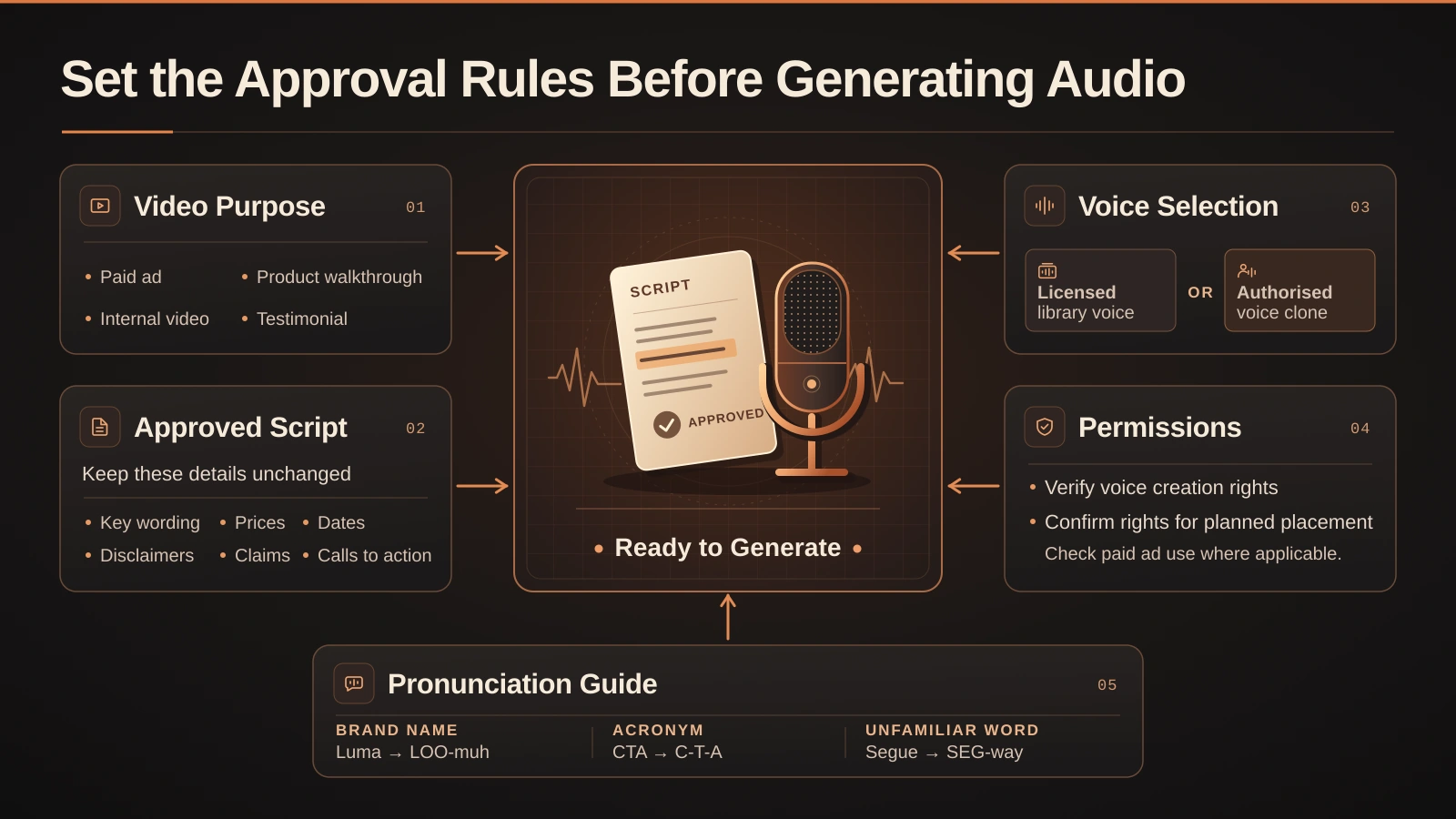
- Establish approval rules before generating audio. Define the video's purpose, target audience, intended placement, approved claims, required wording, and responsible reviewers.
- Keep important information such as prices, dates, product names, disclaimers, and qualifying statements exactly as approved. Use phonetic guides for unfamiliar names and acronyms.
- Verify voice permissions before use, particularly for paid advertisements and cloned voices. Voice cloning requires permission for both creating the clone and using it in the intended content and placement.
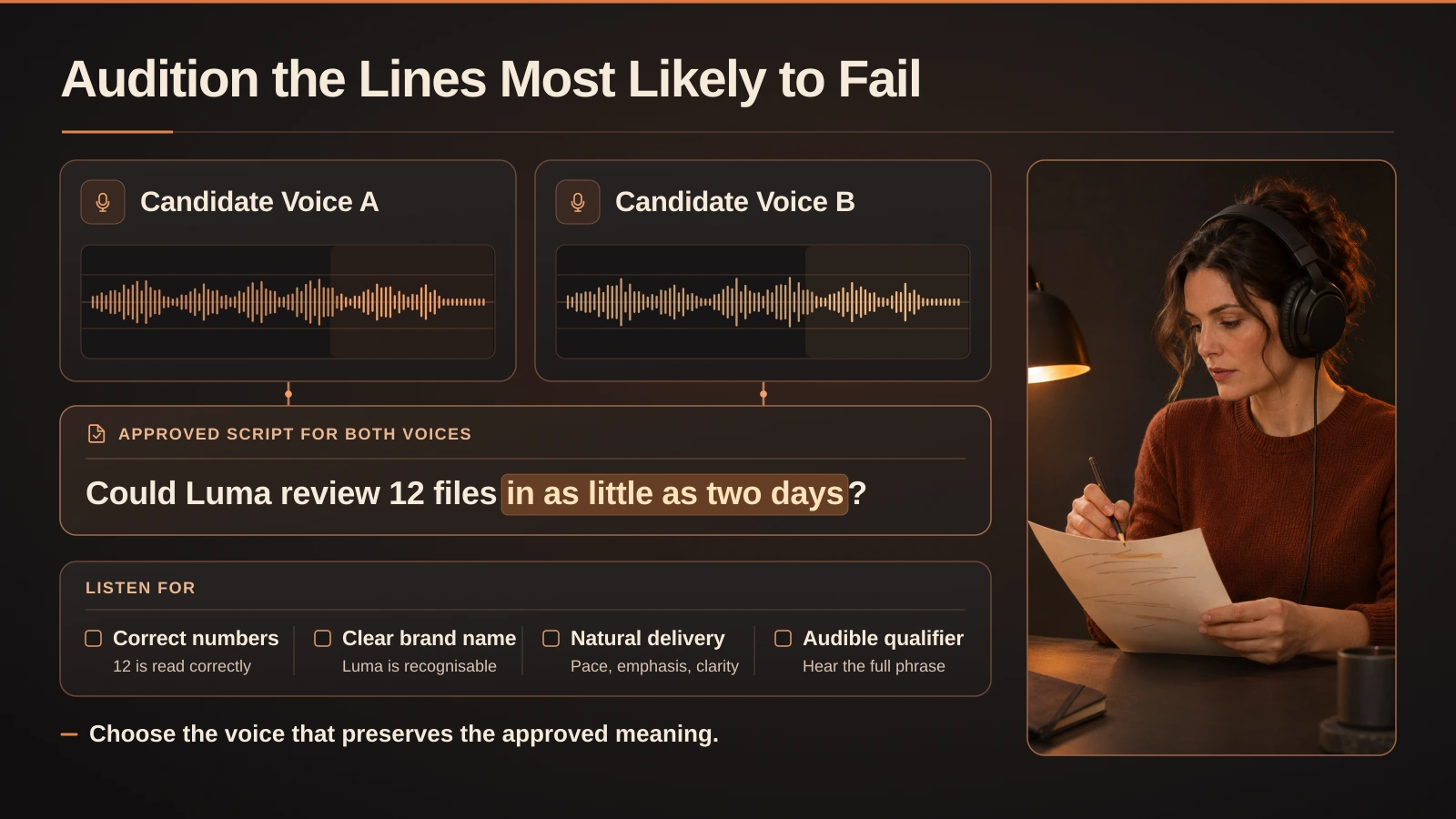
- Audition difficult script sections first, including brand names, numbers, dates, and qualifying statements. Compare the generated narration word for word with the approved copy.
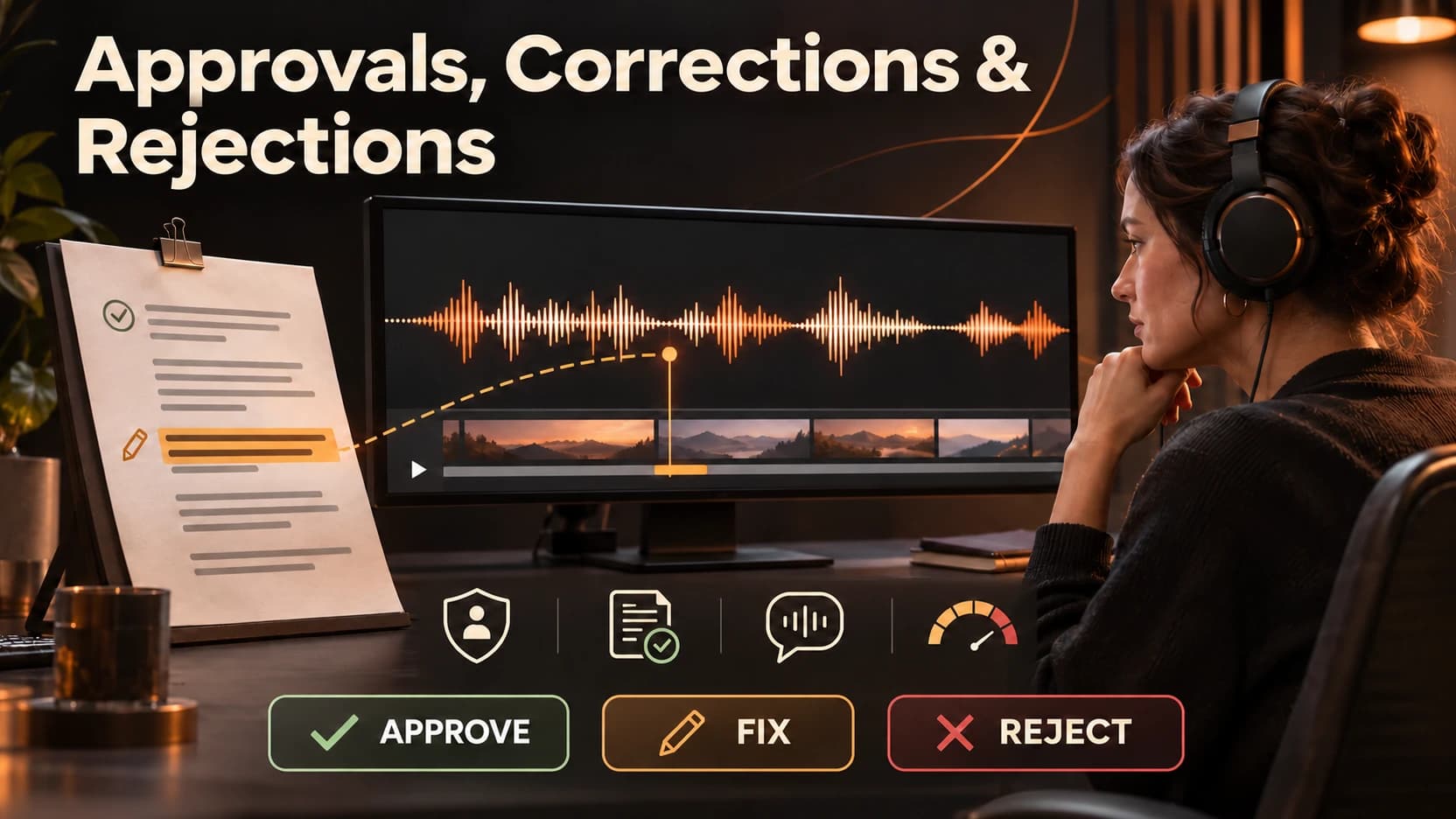
- Evaluate voiceovers using three decisions: **Approve, Fix, or Reject**. Correct pronunciation, pacing, missing words, and mixing issues; reject unapproved voices, unsupported claims, or fabricated testimonials.
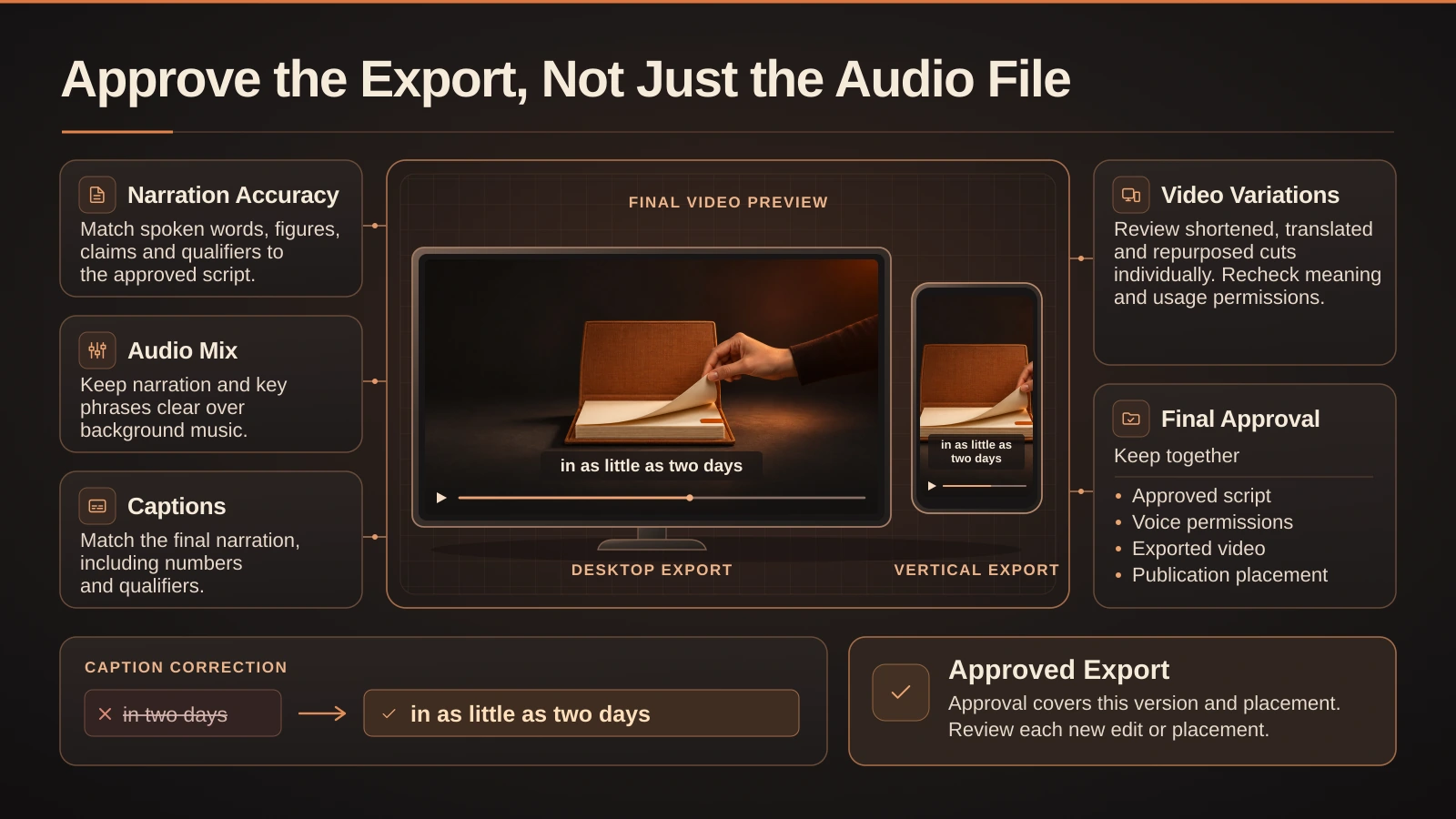
- Review the final video export rather than approving only the audio file. Check that narration, background music, captions, and on-screen text communicate the approved message accurately.
- Pay particular attention to shortened videos, as removing qualifying words can turn a conditional statement into a misleading guarantee.
- Test the final video on a phone at normal volume and with sound muted to verify both audio clarity and caption accuracy.
- Maintain records of the approved script, voice permissions, audio approval, final export, and intended placement.
- Reassess approvals when creating shorter versions, translations, dubbing, or content for new platforms and advertising placements.
- The best AI voiceover workflow ensures that the voice is suitable, permissions are confirmed, claims remain accurate, and the original meaning is preserved throughout the final video.
Approvals, corrections & rejections
The audio seems good. It has a clear voice, good pacing and well mixed music. However, the line “two days” does not match with the approved copy. In the approved copy it says “delivery in as little as two days,” so we have moved from a conditional statement to a definite guarantee.
Using an AI voiceover generator for video will allow you to test out different voices and make changes to specific lines. However, the system will not show if a voice has approval to be used in a paid ad, or whether any claims being made are correct. Or whether qualifying wording can be clearly heard in the final audio.
Use the AI voiceover generator with approved copy and voices that have approval for the required placement. Start in the most difficult areas of the script, then check that the narration matches the copy and final audio. If the copy is correct, give approval. Make corrections if there are issues with delivery. If there are issues with unapproved permissions or misleading claims, reject.
Set the Approval Rules Before Generating Audio
Include details about the video purpose, intended audience, and any information or actions you want to communicate in the narration. The tone of the narration may not be suitable across different use-cases. For example, an internal product walkthrough may have a very different tone to customer testimonials, or paid advertising. Include information on who can approve statements, and who can approve the final video.
Structure the script. Any specific words (prices, dates, disclaimers, claims) should be included as specified. The rest can be tailored (speed, stress, pauses). Include phonetic guides for names, acronyms and unfamiliar words. If any lines do not sound natural, ensure they have been approved for editing.
Include information on which voice is to be used. If using a voice from the library, or a voice clone, ensure different checks are completed. Check that you are within the usage terms of the platform. If using a voice clone, ensure that permission has been granted by the user, for both creation of the voice clone, and use in the video and at the intended location. If it is uncertain that permission has been granted, stop before uploading the sample.
Audition the Lines Most Likely to Fail
Don’t audition voices with an easy opening line alone. Pick a short passage that includes a brand name, a number or date, and a sentence with a qualifier. If the video needs a fast read, include a line that must fit a particular shot without rushing.
Use the AI voiceover generator to render the same passage in two candidate voices. Listen once without reading the script and write down what you heard. Then compare it word for word. This can catch a price that sounds like a different number, a product name that’s hard to recognize, or an emphasis that makes a conditional offer sound universal.
Consider the implication of the voiceover. If the tone is friendly, but the product explanation does not sound like a real experience of using it, then this is a problem. If you have a line such as “I used this for a week,” changing the voice will not make this testimonial authentic. Ensure that you either use approved copy or authentic testimonials (which have been approved for this purpose).
Use an Approve, Fix, or Reject Checklist
Give a reason. If the voice is not suitable but can be fixed within the brief then put ‘fix’. If the version is unsuitable owing to voice/claim and can not be cleared by the team put ‘reject’. A ‘Reject’ doesn’t necessarily mean the video should be rejected - it could mean that changes need to be made to the voice, script or source material.
| Review area | Approve | Fix | Reject |
|---|---|---|---|
| Voice and permissions | The voice is cleared for the named placement. | Attach an existing approval that hasn’t been filed. | The voice imitates an identifiable person without confirmed permission. |
| Script accuracy | Names, figures, qualifiers, and calls to action match the approved script. | Rerender a misread number or a dropped word. | The concept relies on an unsupported claim or fabricated testimonial. |
| Delivery | Speech is clear, with emphasis that preserves meaning. | Adjust a pronunciation, pause, or rushed phrase. | The performance still implies a speaker identity or endorsement the team can’t substantiate. |
| Final mix and captions | Key lines are audible and captions match the approved read. | Lower the music, repair a splice, or correct a caption. | Required information can’t be presented clearly in the planned cut. |
E.g. A voiceover says “up to 30% off.” The music drowns out ‘up to’ and the on-screen text only says ‘30%’. The mix and text should be corrected and re exported. If it is unable to be proven that this level of discount is valid, then reject this version and revert back to the approved text.
Approve the Export, Not Just the Audio File
Check the regenerated text within the edited clip. Regenerated lines may be in line with the script but could be quicker, louder or more formal. If the edit is noticeable, consider regenerating the text entirely.
If you are using an AI video editing tool to create shorter versions, check each cut separately. Shortened content could lead to claims being made without the qualifying information meaning they are accurate. Export and play on a phone at normal volume and then mute and check the captions. Check that what the audience can see and hear matches with what has been approved in the script.
Save the approved script, audio approval, exported video, and where it is intended to go. If dubbing, repurposing for a new market, or publishing a piece internally to paid media, if this change affects any checks, reopen these checks on this version of the video.
Conclusion
Test parts of the script. Only approve if the voice is clean, text is accurate and meaning is preserved in the final version. If errors can be corrected, then do so. Otherwise, do not approve scripts that require permissions or unverifiable claims. For further production ideas follow the updates in AI workflows.
Frequently asked questions