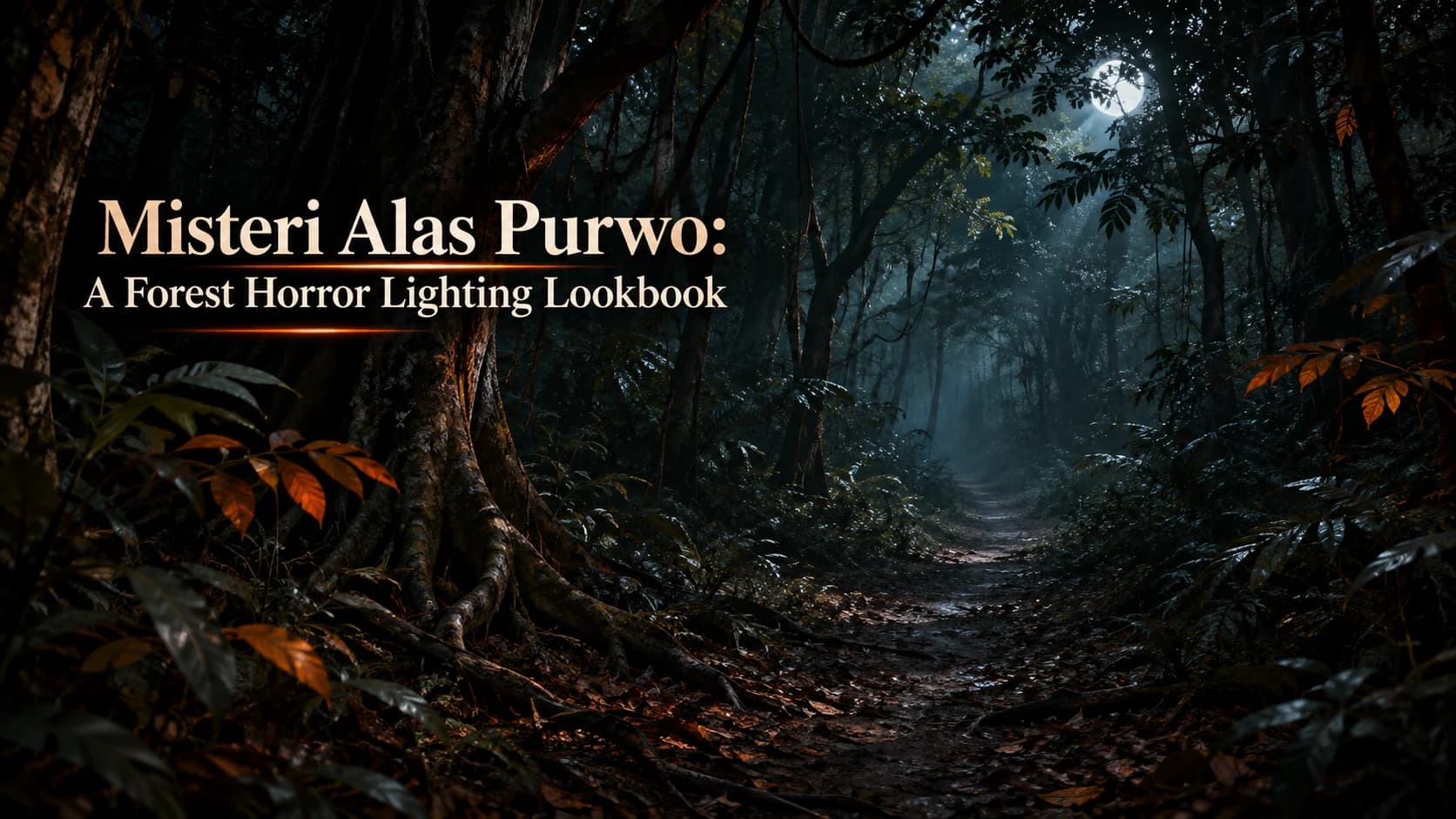
- Alas Purwo National Park in Banyuwangi, East Java, features tropical forests, mangroves, savannas, and beaches that can inspire distinctive fictional horror settings.
- An authentic forest horror look relies on realistic tropical foliage, irregular tree trunks, subdued earth tones, and controlled lighting rather than generic haunted-forest effects.
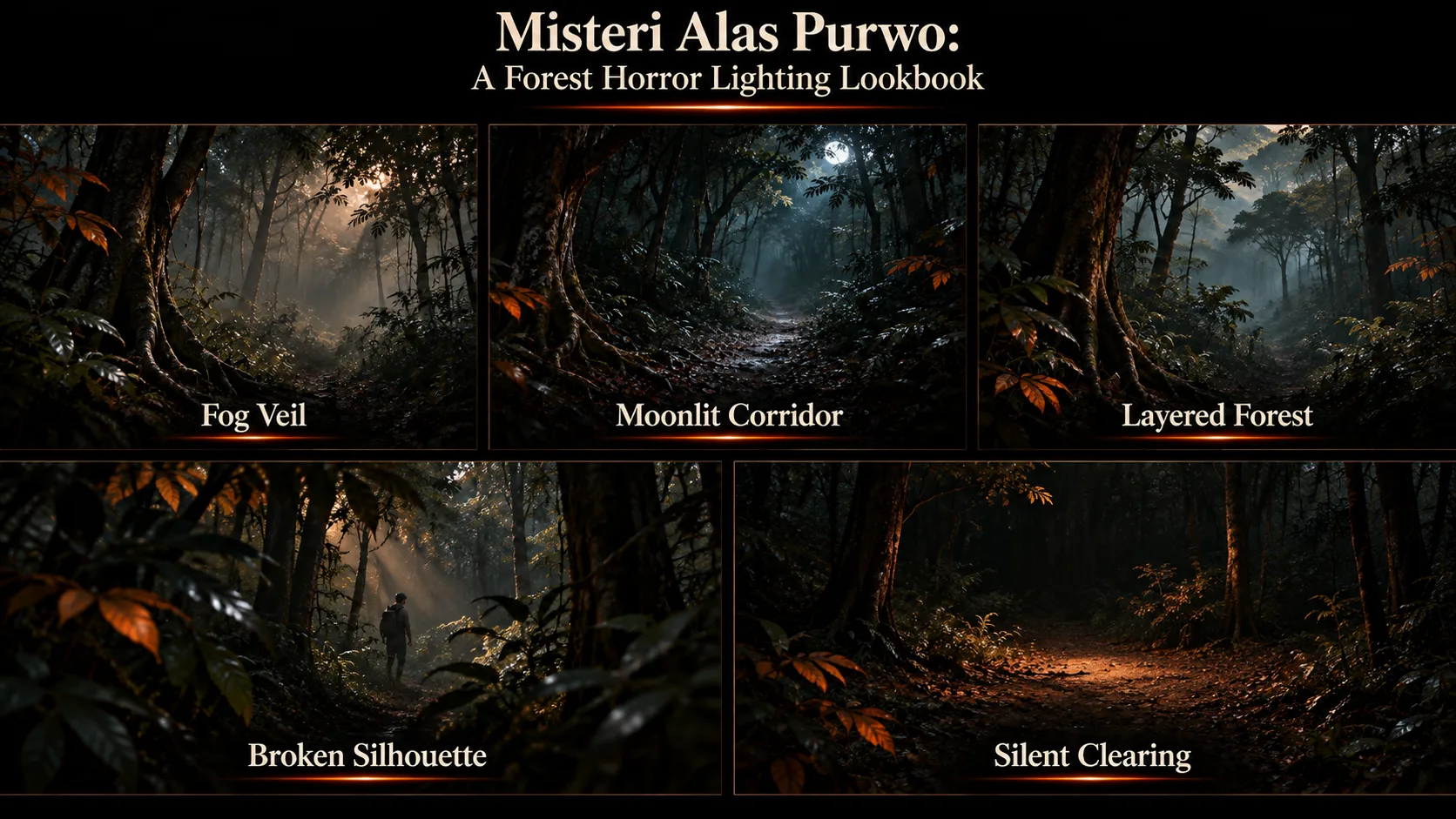
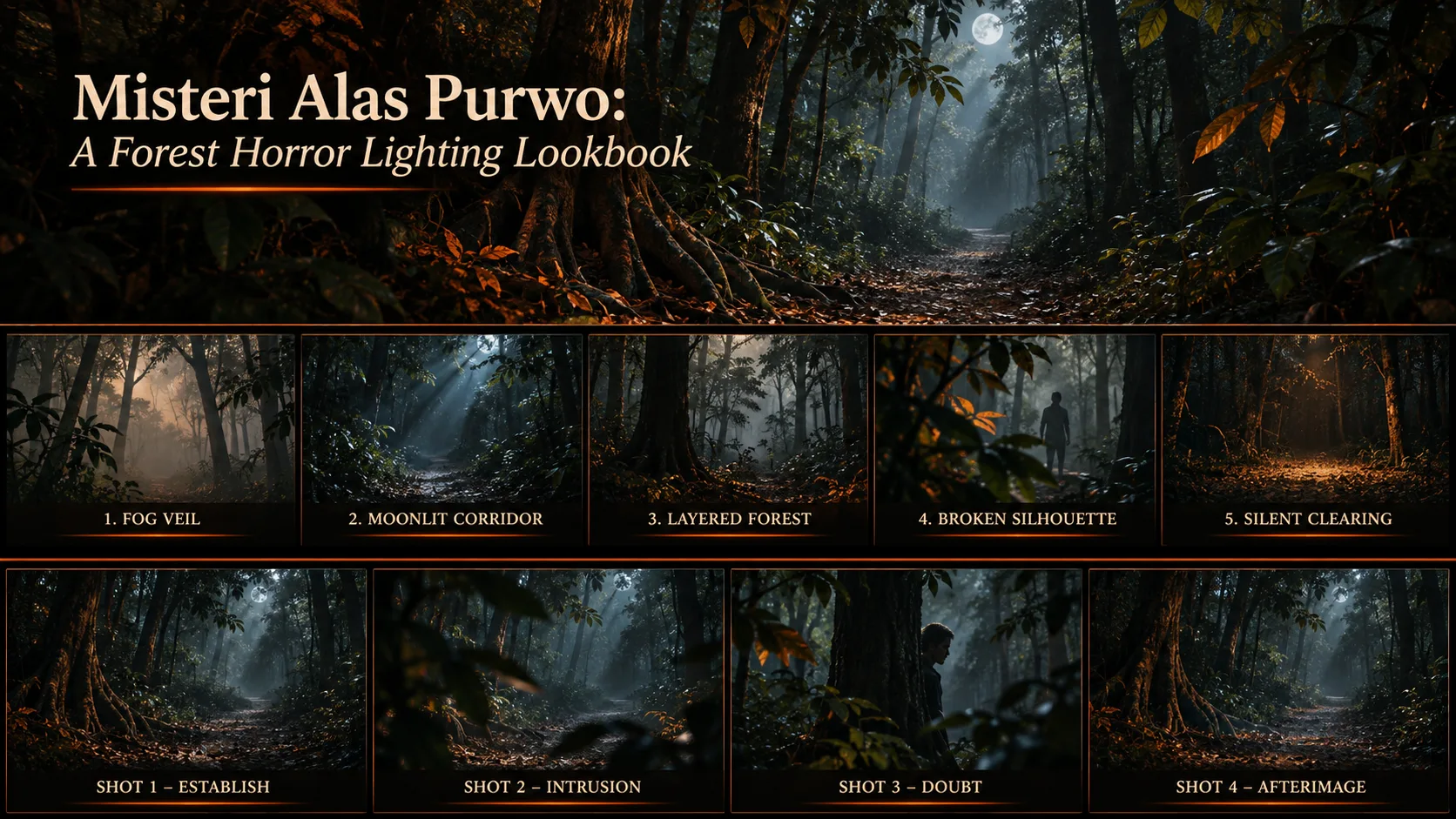
- Five lighting styles can create suspense: fog veil, moonlit corridor, layered forest, broken silhouette, and silent clearing.
- Use thin background mist and soft backlighting to reveal depth without making the forest look artificially foggy.
- Directional, cool toned moonlight and deep shadows help guide the viewer’s attention while maintaining a tense atmosphere.
- Create depth through dark foreground elements, a readable middle ground, and a faded background that encourages viewers to search the frame.
- Test a four shot sequence—establish shot, intrusion, doubt, and afterimage—before animation to maintain visual and lighting continuity.
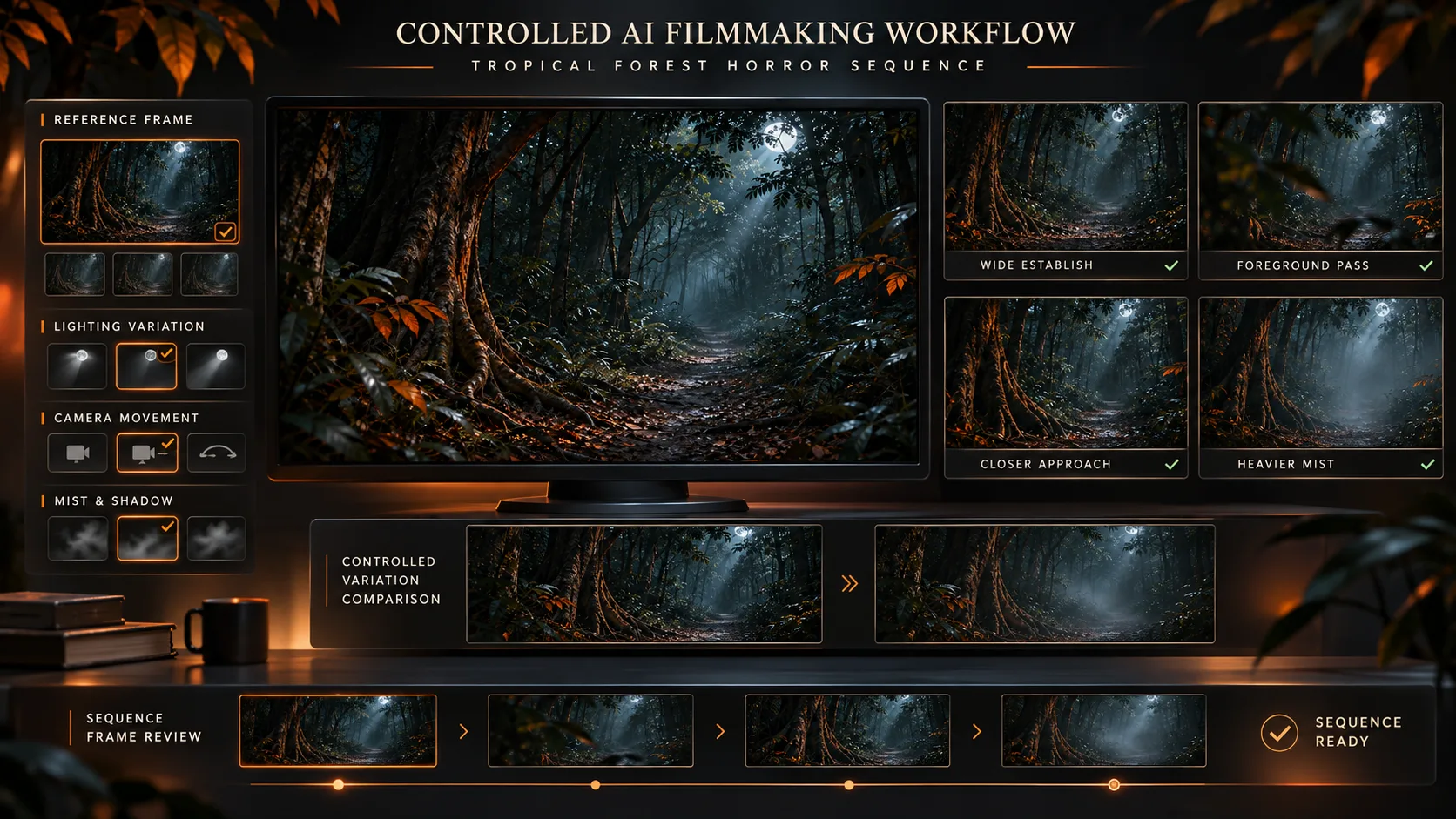
- Xelta’s Cinematic Studio, AI Video Generator, and VFX Effects can help experiment with lighting variations, camera movement, and frame transitions.
- Maintain consistency in mist, tree shapes, moonlight direction, and shadows across shots; subtle movement and simple cuts can create stronger suspense than excessive effects.
- Treat Alas Purwo’s folklore and spiritual traditions respectfully. Clearly identify fictional scenes, avoid using worshippers or wildlife as horror elements, and obtain the necessary permissions before filming in the conservation area.
- 1.A Forest Horror Lighting Lookbook
- 2.Quick Answer
- 3.What Makes Alas Purwo Different From a Generic Haunted Forest?
- 4.The Alas Purwo Horror Lighting Lookbook
- 5.Fog: Reveal the Space, Not the Monster
- 6.Moonlight: Give Darkness a Direction
- 7.Depth: Let the Viewer Search
- 8.A Four Shot Lighting Test Before Animation
- 9.Using Xelta for Controlled Forest Suspense
- 10.Respecting the Park and Living Traditions
- 11.Final Thoughts
A Forest Horror Lighting Lookbook
Creating an eerie atmosphere is easy with a forest location. The lush forests, natural changing light and mysterious paths make Alas Purwo National Park a very pretty place to visit in Banyuwangi, East Java.
There are some amazing stories attached to this mysterious location but let's see what makes these locations so special.
When trying to create a mysterious atmosphere in your fictional forest scene you may find it difficult to achieve. This guide will show you how to create a practical lighting style using fog, natural moonlight, depth and slow movement. We won't be creating a factual story around any of the folklore stories.
Mystery stories surrounding Alas Purwo National Park in Banyuwangi East Java. To give an authentic horror look to your movie you can use selective fog, realistic moon lighting, high contrast between the front and back layer and dark lighting. This can be created in a controlled environment (set or digital).
What Makes Alas Purwo Different From a Generic Haunted Forest?
Alas Purwo is located on the Blambangan Peninsula within the southeast of East Java. It consists of "lowland monsoonal forest, mangroves, savannas and beaches." The trail through the woodland should not feel like it is passing through a savanna/mangrove.
[Note: Indonesia Travel]
It is often known by its Javanese name meaning 'ancient forest' or 'primitive forest.' However, the area is known locally for being a place of meditation and the Javanese month of Suro. This does not mean it is haunted.
Design around tropical foliage, irregular trunks, and subdued earth colors. Use permitted landscape references, not invented sacred sites. In Xelta's Cinematic Studio, creators can explore scene, camera, color, and lighting choices before committing to a sequence.
The Alas Purwo Horror Lighting Lookbook
Vary what viewers can identify. These five looks create different uncertainties.
| Lighting look | Visual recipe | Storytelling effect |
|---|---|---|
| Fog veil | Thin mist behind the closest trees; soft backlight | Suggests hidden distance |
| Moonlit corridor | Cool overhead illumination; narrow highlights on leaves | Guides the eye along an empty path |
| Layered forest | Dark foreground trunks, readable middle ground, faded background | Makes the forest feel deep |
| Broken silhouette | Side lit leaves interrupt a distant human outline | Delays recognition |
| Silent clearing | One small warm highlight surrounded by open shadow | Makes stillness feel suspicious |
These are creative treatments, not records of park conditions. Constant fog and glowing trees feel artificial.
Fog: Reveal the Space, Not the Monster
Mist in the background with crisp foliage and roots. Soft backlit effects between layers of trees. Ensure that if the frame is too bright, dark shapes are added at the edges.
Scene prompt:
A fictional tropical rainforest based on East Java. A narrow and damp path. Faint low lying mist in the distance behind trees. Layers of foliage creating a soft backlit effect. Natural dark foreground. Subtle psychological horror. No ghosts. Cinematic wide shot. 16:9.
Moonlight: Give Darkness a Direction
Monochromatic lighting. Cool tones to highlight the top of the leaves and one side of the path. Soft backlight to add a little light but still show facial features.
Scene:
Fantasy forest path. Lighting is coming from one source to the top left, creating cool tones. There are some highlights from the tropical canopy. One side is very dark. Only one adventurer can be seen on the edge of the scene. Slow zoom. Natural textures. Calm tense mood. No text.
Depth: Let the Viewer Search
A solid black foreground object, a lit area to place your subject in and a soft background.
Create strong contrast in the middle ground and let the background fade out. The viewer will be able to search for more but will never be sure.
After establishing these planes, use an AI video generator for a brief motion study. Specify a slow push in while keeping foreground branches stable.
A Four Shot Lighting Test Before Animation
Create a short sequence using one imaginary corridor through the forest with altered lighting to show the story.
- Establish Shot: A wide static shot with soft lighting to give a sense of scale.
- Intrusion: Slow movement, darkened leaves in the foreground and some mist.
- Doubt: Medium shot with a partial silhouette.
- Afterimage: Returning to the wide shot shows an empty space in the clearing with some lighting.
Ensure that you leave each shot on screen long enough for it to be noticeable and ensure the path, tree and light elements match up.
Using Xelta for Controlled Forest Suspense
For any movement tests, create a reference frame for each lighting variation. Create a description for the movement within each shot. e.g. slow moving, swaying movement, subtle change in reflection. Compared to the lookbook.
Test for common issues:
- Changing mist direction and thickness between shots.
- Distorted tree trunks from camera movement.
- Moonlight flipping sides without a reason.
- Shadow blocking the landscape.
Where a transition genuinely needs a visual effect, Xelta's VFX Effects offers an option for experimenting with start to end frame transitions.
Keep the effect almost imperceptible; suspense often benefits from a simple cut.
Respecting the Park and Living Traditions
An Alas Purwo is an area of conservation and is considered a spiritually active area. The animals and worshipers should not be used as a scary feature. Local myths are just local beliefs and stories told by the locals.
Use official sources, filming permits or digital creation.
No smoke effects, lighting, blocking of trails or night time filming can be done within the area of conservation without the correct permission. If using any sacred sites or rituals in your footage you must speak to those who know about it and gain their permission.
Final Thoughts
The best aesthetic to create an Alas Purwo inspired horror scene is to not focus on ghosts but realistic forest settings and pacing.
Pick one distinct tropical setting. Add mist, directional moonlight and shadows within the foreground to change the audience's feelings towards what they are seeing.
Ensure you have a 5 look lighting board and 4 shot movement test to ensure there are no continuity issues.
Ensure the visuals are clearly indicated as fiction. Keep in mind the culture of Banyuwangi and ensure the real natural landscape is kept within the scene. A simple aesthetic can often cause more suspense than a complex visual effect scene.
For more creative AI storytelling inspiration, explore Xelta Indonesia on LinkedIn.
Frequently asked questions