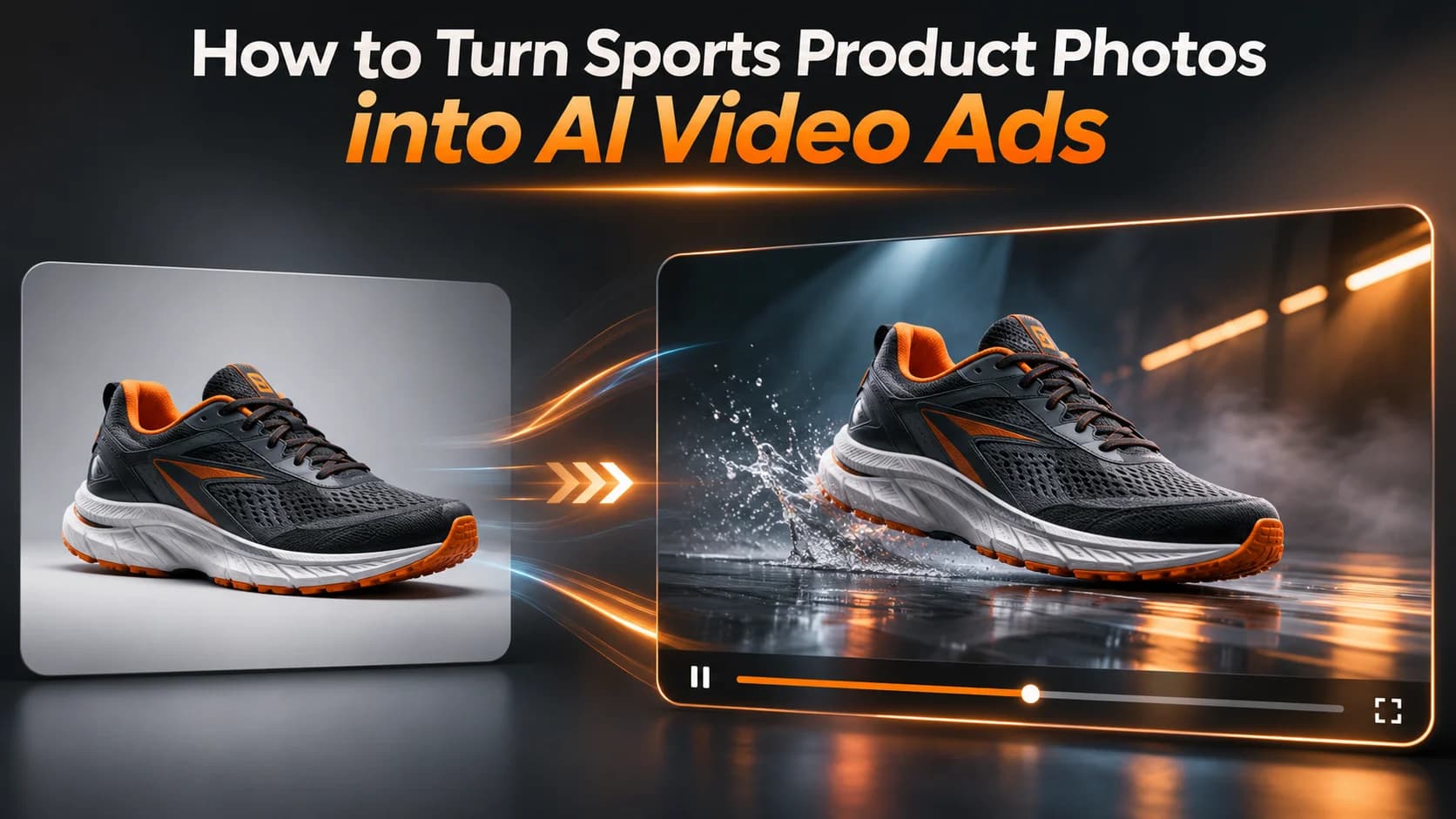
- Sports product photography involves capturing the image of a product at that instant.
- The process of converting sports products images into AI videos involves uploading a good quality image of the product onto the software, describing the camera movement and animation effects, and choosing appropriate video settings.
- In image-to-video production, an existing image is used as the initial image frame or visual cue depending on the particular AI algorithm.
- Selecting the publishing channel for the video is next.
- 1.From Static Sports Photography to Product Videos
- 2.Quick Answer
- 3.How Does AI Convert Sports Product Photos into Videos?
- 4.How to Turn Sports Product Photos into AI Videos: Step-by-Step
- 5.2. Define the Purpose of the Video
- 6.3. Upload the Image to an AI Video Generator
- 7.4. Write a Clear Image-to-Video Prompt
- 8.5. Generate and Review the Video
- 9.AI Video Prompt Examples for Sports Products
- 10.Combine Individual Clips into a Sports Product Advertisement
- 11.Where Can Businesses Use AI Sports Product Videos?
- 12.Common Mistakes to Avoid in AI Sports Product Videos
- 13.Conclusion
From Static Sports Photography to Product Videos
Sports product photography involves capturing the image of a product at that instant. It can be possible to photograph a running shoe from several angles and show a tennis racket against a plain background. These images are very useful for use in listing the product, but motion could be another form of viewing the product for advertisement.
With the image-to-video AI technology, companies are able to turn their product photographs into short videos. Camera movements, varying reflections, and even the surrounding animations can all be achieved without having to shoot a whole new scene.
This is another option for sports companies, online retailers, and even marketers to create content for product launches, e-commerce platforms, and social media promotions.
The process of converting sports products images into AI videos involves uploading a good quality image of the product onto the software, describing the camera movement and animation effects, and choosing appropriate video settings. The next step includes generating the video, ensuring that product specifics are accurately depicted, and compiling the selected footage into a video.
How Does AI Convert Sports Product Photos into Videos?
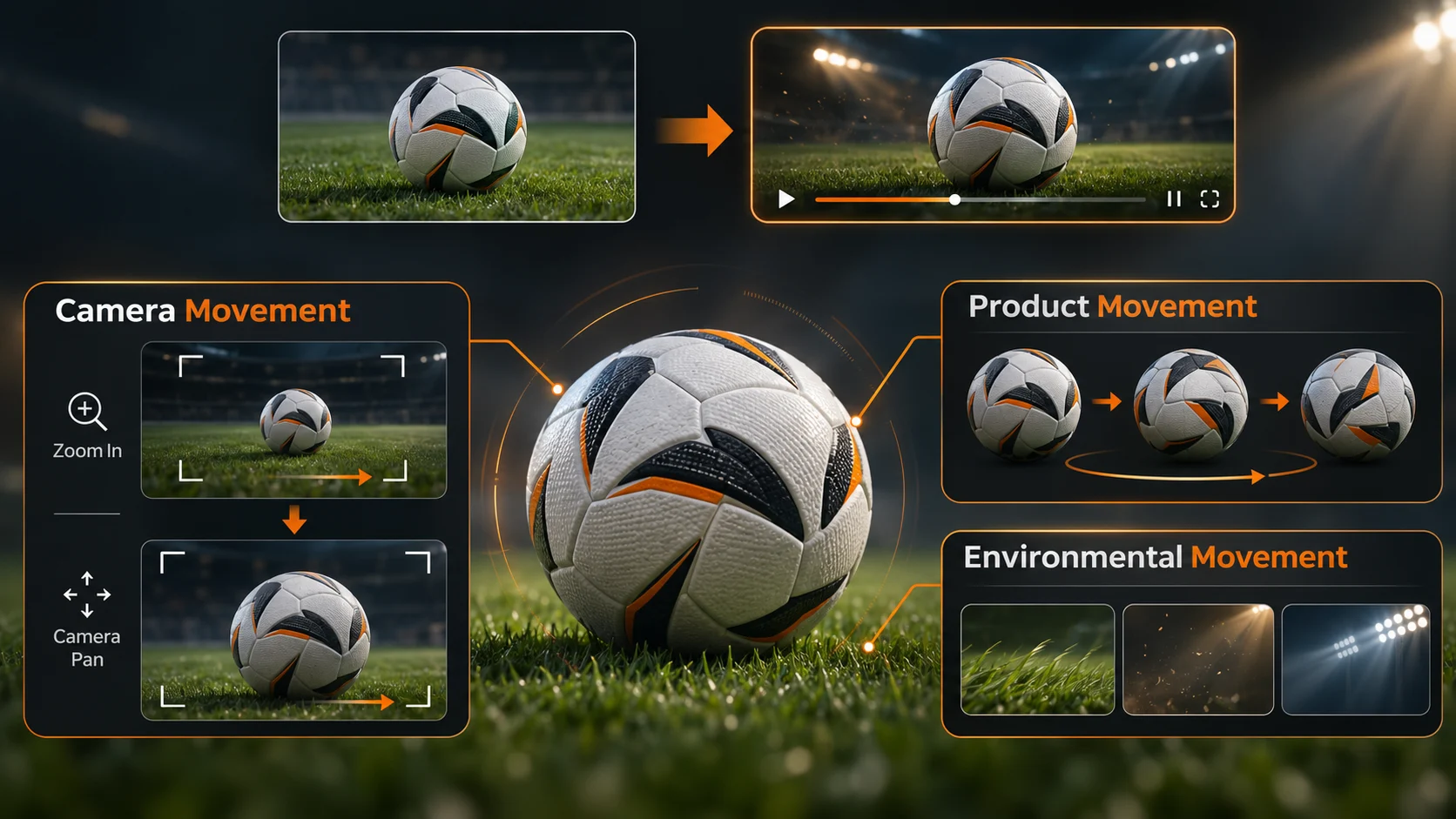
In image-to-video production, an existing image is used as the initial image frame or visual cue depending on the particular AI algorithm. The image serves as a source of data concerning the visual appearance, composition, and surroundings of the product.
A textual description defines how the scene should be transformed over time. For instance, a photo of a football placed on artificial grass can be converted into a video in which the camera zooms into the ball while stadium lights highlight the background.
The movement is usually classified into three types:
- Camera movement: Zooming, panning, and changing camera angles.
- Product movement: Rotating or otherwise moving the product captured in the photo.
- Environmental movement: Changes in shadows, water, dust, and other elements of the surroundings.
A controlled camera movement might be a reasonable way to start for commercial product videos due to potential visual errors related to any significant product movement.
How to Turn Sports Product Photos into AI Videos: Step-by-Step
1. Select a High Quality Product Photograph
Start with a good picture that will accurately reflect the product itself. Small elements like stitching, soles of shoes, equipment grips, and branding must be visible in the picture.
The right source picture must contain:
- Clear outline of the object and enough resolution.
- Accurate colors and balanced lighting.
- No distracting elements in the background.
- A sufficient space around the object for the camera to move.
In case it is possible, try to gather pictures of the object from different sides. Pictures of the front, side, and rear view of the object can be used to produce separate clips.
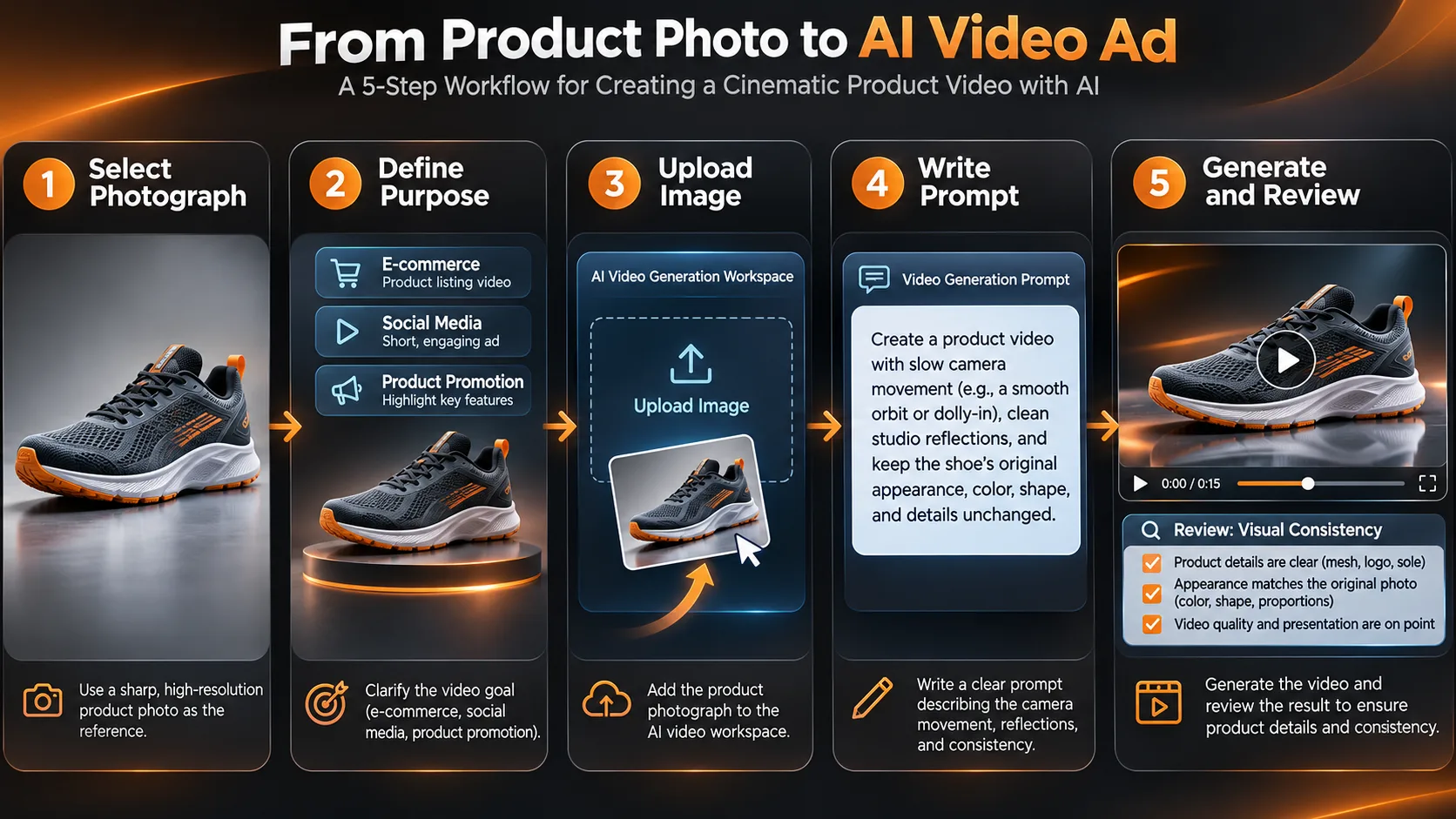
2. Define the Purpose of the Video
Selecting the publishing channel for the video is next. The product demonstration of an eCommerce website would need slow motion with close-up shots. An ad for sportswear in Instagram could utilize fast cuts and athletic locations.
Think about the message that should be conveyed before choosing the right visual effects. A marketing campaign for running shoes would highlight its soles whereas that of gym bags would emphasize its compartments.
Every footage should express an individual element of the product.
3. Upload the Image to an AI Video Generator
After the photograph is prepared, it should be uploaded into the reference image-based image-to-video converter.
Sportswear brands may utilize Xelta’s AI Video Generator to generate videos based on photographs and motion description.
Pick an appropriate model and check the offered time, aspect ratio, and resolution parameters. They may vary depending on the video creation model.
Begin with a relatively easy frame. Camera movement around the static product gives an opportunity to evaluate how good the appearance of the product is maintained by the model.
4. Write a Clear Image-to-Video Prompt
A helpful prompt includes details of how something should be done in the video. The image in the uploaded photograph already provides most of the visual elements, hence there is no need for much description of the already existing product.
Provide directions on how the camera should move, speed of motion, and how the environment should change. Also, mention any characteristics of the product that should remain constant.
For instance:
The camera slowly moves towards the running shoe from a low side angle. Studio reflections gently glide over the surface of the shoe. The shoe remains stationary with its colors and logo.
Instructions are more definite than simply asking for a good sports advertisement video.
5. Generate and Review the Video
Take the time to review the video created. The video may look very convincing when viewed at regular speed; however, you may find something is different about the product shape or logo on any particular frame.
Watch out for the following:
- Proportions and construction of product.
- Location and spelling of logos.
- Color and material matching.
- Shadows and reflections.
- Movement and texture.
Should you discover any errors, try simplifying your motion instructions or using a different photo before generating your video again.
AI Video Prompt Examples for Sports Products
Different sports products require different approaches to movement. The following sample prompts provide practical starting points for image-to-video generation.
| Sports Product | AI Video Prompt |
|---|---|
| Running shoes | A slow lateral camera movement reveals the shoe's original mesh texture and sole construction under soft studio lighting. |
| Football | The camera gradually approaches the stationary football on a grass pitch while distant stadium lights remain softly blurred. |
| Cricket bat | The camera moves vertically along the bat, revealing its wooden grain and original handle grip. |
| Tennis racket | A controlled camera movement reveals the racket frame and strings while preserving its original shape. |
| Gym dumbbell | The camera moves closer to the dumbbell as subtle reflections travel across its metallic surface. |
| Sports backpack | A slow camera arc reveals the bag's visible compartments, fabric texture and original zipper placement. |
These prompts can be adjusted according to the photograph, campaign requirements and capabilities of the selected AI model.
Combine Individual Clips into a Sports Product Advertisement
An advertisement can also be composed of multiple separately created videos. This gives you better control over each scene and allows you to substitute a scene in case there is an error.
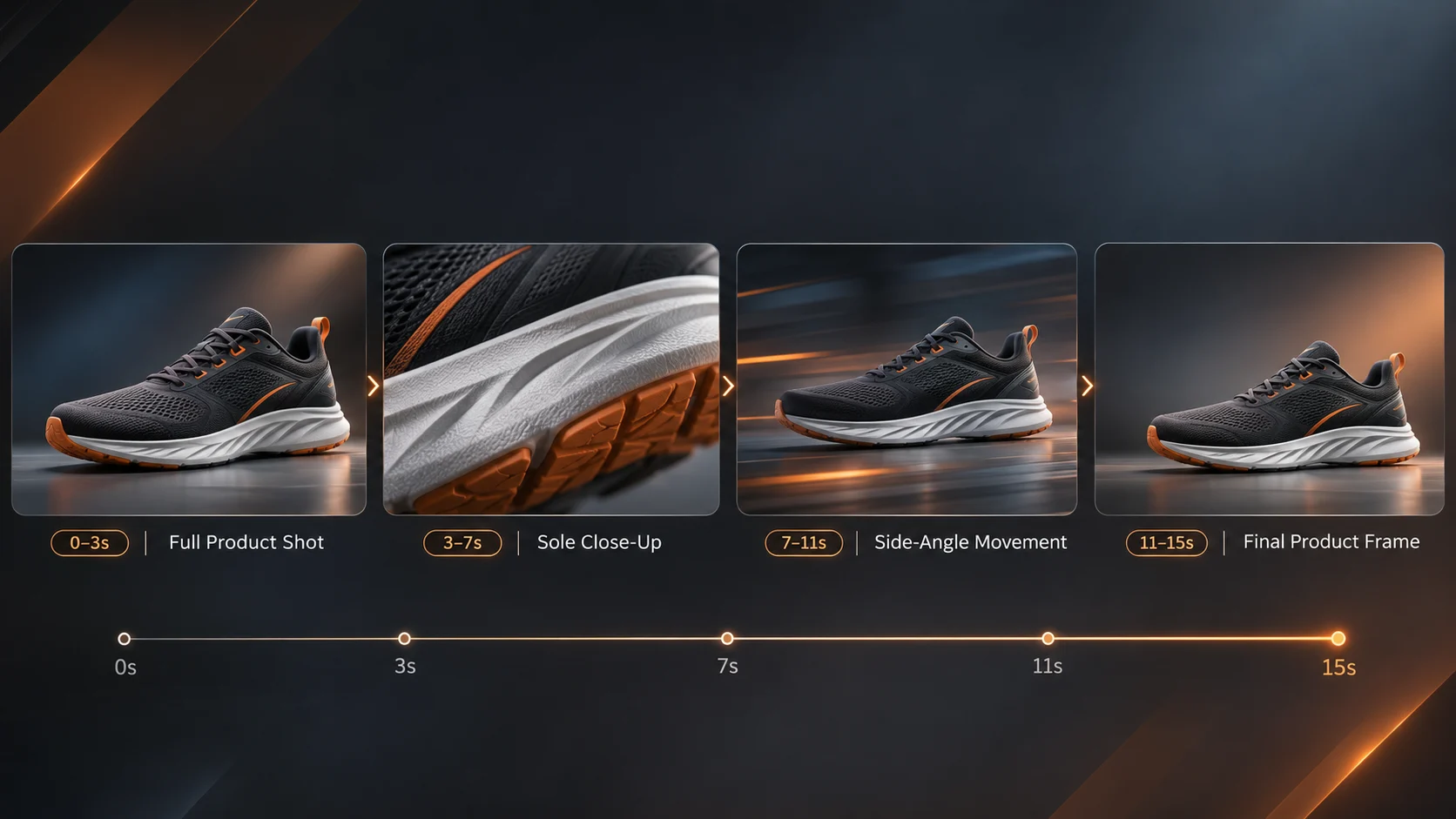
Look at the structure of a 15-second running shoes advertisement.
| Duration | Scene | Purpose |
|---|---|---|
| 0–3 seconds | Full product shot | Introduce the shoe |
| 3–7 seconds | Close-up of the sole | Display construction details |
| 7–11 seconds | Side-angle camera movement | Present the product design |
| 11–15 seconds | Final product frame | Display branding and call to action |
Software like Xelta’s AI Video Stitcher is able to merge separate video clips to create a seamless stream of footage.
Ensure uniform lighting and color continuity in between the shots. Text elements can be added in the editing phase to ensure there is no distortion of letters.
Where Can Businesses Use AI Sports Product Videos?
A sports retailer can prepare several video formats from the same collection of photographs.
| Marketing Channel | Suggested Aspect Ratio | Application |
|---|---|---|
| Instagram Reels | 9:16 | Product launches |
| YouTube Shorts | 9:16 | Short product showcases |
| Facebook Feed | 4:5 or 1:1 | Promotional campaigns |
| YouTube | 16:9 | Product presentations |
| eCommerce websites | 16:9 or layout-specific | Product detail pages |
Structured marketing campaigns will benefit from Xelta's AI Ad Generator that prepares advertisement materials based on the products offered by the company.
It should be formatted in such a way that it leaves enough room for brandings, captions, and marketing messages.
Common Mistakes to Avoid in AI Sports Product Videos
Even an appealingly generated video by the AI does not necessarily reflect reality when it comes to a product. Such a concern becomes especially relevant when the video itself plays a role in shaping someone's decision to buy.
Typical issues involve:
- Blurry and/or compressed images.
- A request for complex motion in a tiny clip.
- The changing of logos and/or colors of products.
- Incorrect dimensions of equipment.
- Unverified data on product's effectiveness/durability.
- Posting of video without a check of individual frames.
In the case of technical tests, such as headgear impact resistance or shoe cushioning efficiency, videos of real tests should be posted alongside verified information.
Conclusion
Transforming the pictures of the sports products into an AI video provides an efficient way to produce more marketing material from the existing pictures. The sports shoes, sportswear and fitness gadgets can be showcased using precise camera moves and scenes.
The key factors that influence the effectiveness of this approach include good quality of the pictures, the use of the prompts, and the visual analysis of the resulting footage.
For more creative AI workflows and product video ideas, explore the official Xelta AI YouTube channel.
Frequently asked questions